


more quick actions
minimize quick actions






Hello,
One our SI is installing an application with connection to a SQL Server DB (for historical data). The end-user IT department doesn't authorize connection to their SQL Server using the sysdamin access rights level.
The SI was able to create and do a first connection to the DB using the sysdamin access rights so the DB has been created.
Now he is trying to establish the connection using a non-sysadmin user and the connection fails:
- The "test connection" is successful
- But the connection a startup fails. "2014/10/30,15:23:45.022,LEHAVRE,juroy,HDS,E,0,0,CDbMgtSQLServer::Connect __ Failed to connect to SQL Server 'Carolina.amt.qc.ca' iTest = 10 (80043C9D)"
Doesn't anyone knows the minimum SQL Server user-rights configuration needed for a user that is not sysadmin?
Thank you.
Emmanuel
Posted : 31/10/2014 8:22 pm
Manu, I just make a test.
Fisrt I create a SQL user with db_admin right like this :

After I make the configuration of the database in PcVue with this user, then stop and restart PcVue to create the database.
And after I grant write and read right to the user like this:

And it works 😉
Posted : 31/10/2014 8:40 pm
Hello,
The problem has been solved! The solution: In the user "Login Properties", the "User Mapping" configuration should include not only the database to be connected to but also the server database "master", "model", "msdb" and "tempdb".
I am not convinced we need the mappimg for all of these server database but at least it working with all of them being "mapped".
Thank you all for your help.
Posted : 01/11/2014 1:10 am

Hi,
I had exactly the same issue last week in Taiwan!!
For information we were using SQL 2012.
I didn't have the idea ticking all DBs in the "User mapping" properties but only the PcVue DB. Therefore I let the site with Pcvue user configured as sysadmin.
Romain, any idea why we need ticking all dbs? Actually, I suspect that maybe only the TempDB is mandatory...
You agree that allowing the PcVue user to be able writing the Master DB is not really safe...
Posted : 03/11/2014 10:06 am
Hi,
a customer of mine has the same problem, but in their case the configuration described by Romain also does not work unfortunately. They are using SQL Server 2012.
They told me that it depends on one granted right. CONTROL SERVER.
When they have granted this right with SQL Authentication, everything is fine. But as soon they remove the right PCVue cannot connect to the database anymore.
I read that this right provides almost the same permissions as sysadmin. The only difference is that you can explicitly forbid some actions...
Now my question is, if the CONTROL SERVER right is mandatory for a successful connection between PcVue and a remote SQL server?
If you need more information, don't hesitate to contact me directly.
Thanks a lot in advance?
BR,
Daniel
Posted : 04/12/2014 7:44 pm
Hi Nico, sorry I missed your post, actually I don't know why we need to be connected to all database.
Extract of Microsoft MSDN:
TempDB is used when insert and delete is done.
The master database records all the system-level information for a SQL Server system. This includes instance-wide metadata such as logon accounts, endpoints, linked servers, and system configuration settings.
So I think that we need it.
Model contains default properties of databases
The msdb database is used by SQL Server Agent for scheduling alerts and jobs and by other features such as SQL Server Management Studio, Service Broker and Database Mail.
For CONTROL SERVERpermissions, I don't see why this one is mandatory for remote SQL.
Posted : 08/12/2014 8:59 pm
Hi Romain,
That's strange. I wonder why it only works for them with the CONTROL SERVER right granted...
Are their some information they could extract and provide me to check if the cause for that is somewhere else?
Thank you.
BR,
Daniel
Posted : 09/12/2014 4:20 pm
I don't know which information you can extract. MAybe they have a specific policy and they must have this permissions.
Posted : 10/12/2014 2:16 pm

On SQL SERVER 2014
The SQL user must have at least
Master : datareader
model : datareader
msdb : datareader
tempdb :reader / writer / ddladmin
sur la database owner / wrtier / reader +/ ddladmin
Posted : 20/06/2017 8:29 pm
Hi Nico P,
Actually what you wrote is true .... and wrong!
Yes, if you apply the ddladmin it works.
But that's not a good practice and if you connect to an existing DB managed by customer's IT department they will probably refuse it.
Having this rights issue several months ago, I searched and found the reason why this right is requested and the work around.
@Romain: Maybe it would be the good time to make a KB article on this topic. :whistle:
Nico
Posted : 21/06/2017 8:23 pm
It's my customer's IT department who told me that. In my case he accepted to appply the ddladmin but if it is not a good practice I'm waiting for the KB article.
@Romain: I need it for yesterday 😉 !
Posted : 22/06/2017 10:35 am
Hi everybody,
We had those problems with the SQL rights with one our big client who needs security : swiss army.
They migrated PcVue from version 10.0 to 11.2 et SQL from 2008 R2 to 2012 a few month ago. Here the Romain's answer which suits with my customer's database security.
Sorry it's in french :
David m’a fait part de vos demande concernant la connexion aux base de données SQL sans droit sysadmin.
Voici le résultat de nos différentes recherches, tout cela fera l’objet d’un article KB au plus vite.
Je confirme qu’il s’agit d’une différence de comportement apparue entre SQL 2008R2 et SQL2012 :
Lors de la connexion par le HDS à une base (déjà créée), le driver SQLDMO demande des infos a SQL afin de stocker en mémoire des infos via la procédure stockée sys.sp_MSdbuserpriv N’Ver’
C’est reproductible sur SqlServer en exécutant directement la requête execute sys.sp_MSdbuserpriv N'ver'
En lançant PcVue avec un utilisateur public avec les droits minimaux on observe deux comportements différents entre SQL 2008R2 et SQL 2012 :
- Dans le premier cas avec SQL 2008R2, aucun soucis pour exécuter la procédure stockée.
- Pour 2012 et plus, impossible d’effectuer l’opération. Le driver renvoie faux et enchaine sur fail to connect.
Le seul contournement qui sera obligatoire pour ce cas je pense sera de donner les droits d’exécution de cette procédure système a l’utilisateur.
Cela se fait en deux étapes :
- Mapper l’utilisateur sur la base Master en droits invité (Etudier si il y a un impact, mais avec un rôle guest je ne pense pas)
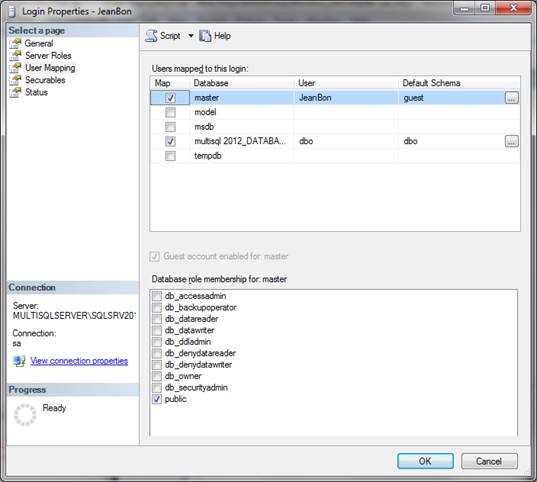
- Donner le droit d’exécution sur la procédure stockée :
• Par requête :
grant execute on OBJECT::sys.sp_MSdbuserpriv
to JeanBon
• Par interface, dans la base master -> Security -> Users:
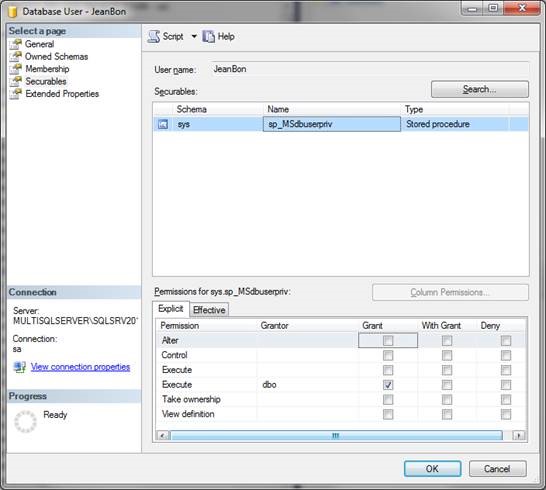
Manu
Posted : 22/06/2017 11:57 am
The KB article is just released, Robin did it yesterday (KB869)
Posted : 22/06/2017 12:50 pm
Hi
KB869 is in private/draft ? I can't find it. Could you please send it to me by mail
Nico Kunzer : is it possible to allow Atys guys accessing private/draft article ?
Posted : 23/06/2017 1:46 am
Article is in Historical Data Mgt
Posted : 23/06/2017 11:53 am
- 1
- 2