


more quick actions
minimize quick actions






Topic starter
Hello,
In a project we are using Solar inverters with the attached Modbus RTU addresses. This inverter is connected to a Data logger which act as a protocol converter from modbus rtu to modbus tcp. I used port 503 as per the spec of datalogger. Please let me know how to create a frame for the following modbus addresses: 300, 301, 507,1003 and 1070. Because once I link address with a variable, Equipment out of service error is showing. And also do we need to open port from windows 10?
Thank you
Tijo
Posted : 17/05/2018 12:12 pm

Hi Tijo,
When you are in that situation the best is to try first with a third party Modbus Master like Modscan32
Nico
Posted : 17/05/2018 3:22 pm

Hi Tijo
You need to configure Word I/O type frame.
First try with a single frame of limited starting address 300 and requesting only 2 words.
According to the documement you need to check the equipment type you will select.
It is either
Modbus Dec or JBUS Dec.
I would test first Jbus with frame address 300 and then Modbus with frame address 300.
Check the complementary status word on youor frame for error code. No need to click on the ... button
If you get error code 1 or 2 (then you need to change the equipment type from Modbus to Jbus.
If you get error code 102 then you have a communication problem with your device and you need to sort that out first before change the frame configuration.
I hope this help
Best regards,
Manu
Posted : 18/05/2018 6:49 pm
Topic starter
Hi,
@Nico: I tried with Modscan32 it shows the error Tcp/IP connection terminated.
@Manu: I followed your steps in configuration Node shows an error 701 and frame shows 2045 once it link to a variable.
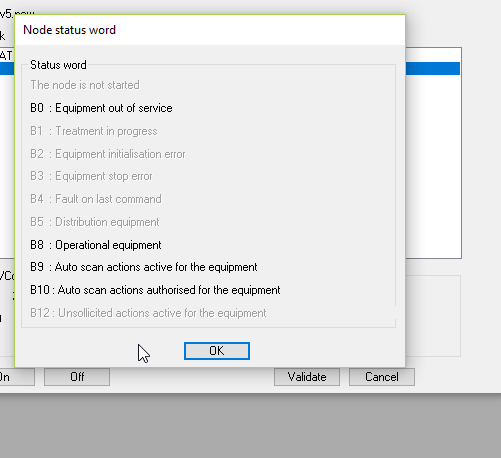
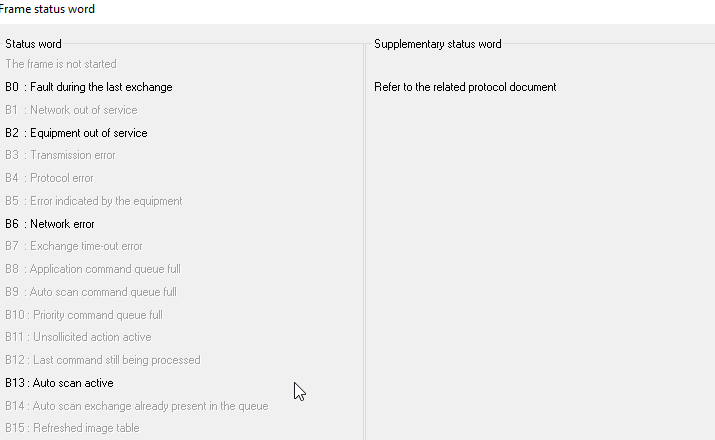
What should we do?
Posted : 21/05/2018 1:36 pm
That's the point, if it doesn't work with Modscan no way it works with PcVue.
So, fix your issue with Modscan first....
Nico
Posted : 21/05/2018 2:01 pm
I advise you contact the device manufacturer support first. Once fixed with them with Modscan then you can switch to PcVue.
Nico
Posted : 21/05/2018 2:02 pm
Hi Tijo
regarding the test in PcVue as I told you I need the supplementary status word.
So don't click on the "...' button.
Under the 2045 you must have another code displayed . That is the important one. And unfortunatly we cannot see it in you frist screenshot
This code give you the error you have for the specify protocole you selected.
And the code should be explain in the help for the driver.
102 : You cannot connect to the PLC. Check ping
2: you request too many data
1: you request the wrong type of data.
Posted : 22/05/2018 11:11 am
Topic starter
Hello Nico,Hello Manu,
Problem was from the device side. Solved. Now Connection is good. But I got some error like below for some registers in real data type
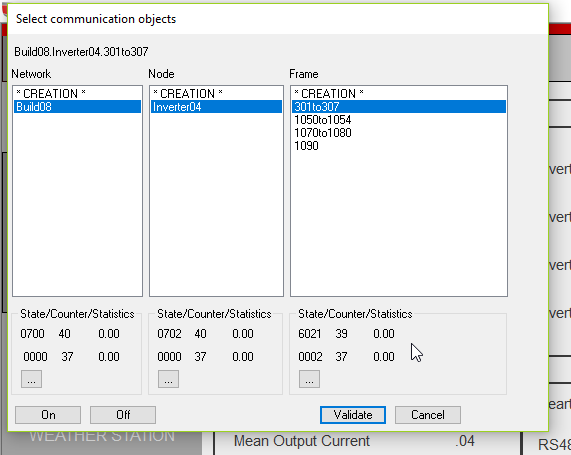
In the same equipment for some other registers in real data type, it is working good. Is it is a problem from equipment side?
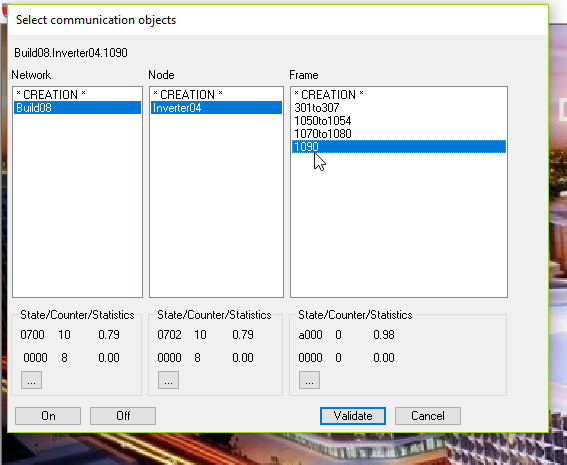
Posted : 23/05/2018 7:49 pm
Hi Tijo
Your frame "301to307" display the error code 2. That is invalid data. You must be asking too many data for this frame.
- What is the configuration of this specific frame?
- Starting address number of data and type of data?
If you selected Real type frame then the starting address should be 301 and the number of data (ie number of float) should be 4 and not 8.
Please check and send us the frame configuration that causes the complementary status word error 2.
Posted : 23/05/2018 8:11 pm

Hi Tijo,
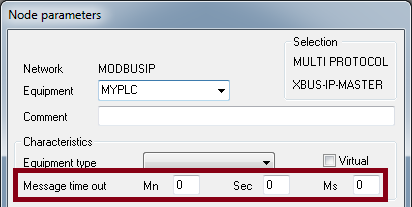
The 702 code means you have configured a message time out in the node.
While beginning tests, it is strongly recommended not to change the default values.
Here is where you can find the meaning of the status 0002
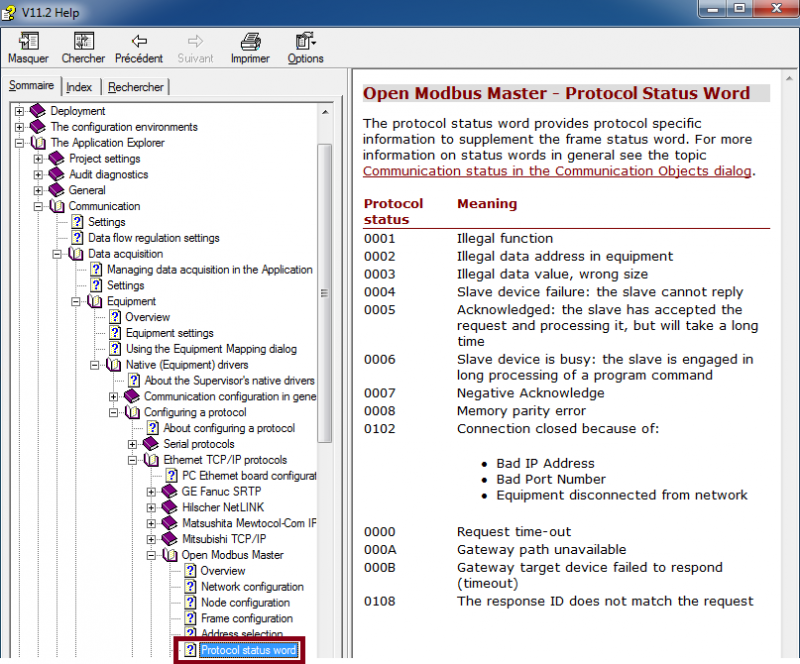
Edouard
Posted : 23/05/2018 8:41 pm
Tijo,
Could you either copy / paste the content of your .CComm.dat file or give us screenshots of:
- Node Inverter04
- Frame 301to307
- Frame 1090
BR
Edouard
Posted : 23/05/2018 9:19 pm
Topic starter
Hello all,
@Edouard I changed message time out to 5 sec. Noted your remark and will change accordingly.
The following is copy paste from comm.dat
VERSION,1,0
BOARD,0,1,1,0,0,0,0,,,0,0,""
NETWORK,0,0,Build08,263,,0,0,NO,0,0,0,5,0,1,0,0,,,0#0#0#0#0,,,0,0,"",0,0,3,,,1
EQT,0,0,0,Inverter04,1,MODBUS_DEC,4,0,5,0,0,5,0,1,0,,0,,90#0#0#1#503#0#0#10#0#0#0#0#0,0,,,0,0,"",0
FRAME,0,0,0,0,301to307,3,16,4,R,300,Real I LMsb ,8,0,0,5,0,0,0#0#0#0#0,0,1,1,,,0,0,""
FRAME,0,0,0,1,1050to1054,2,10,5,R,1049,Word I ,2,0,0,5,0,0,0#0#0#0#0,0,2,1,,,0,0,""
FRAME,0,0,0,2,1070to1080,3,80,20,R,1089,Real I LMsb ,8,0,0,1,0,0,0#0#0#0#0,0,3,1,,,0,0,""
FRAME,0,0,0,3,1090,4,24,6,R,1069,DWord I MLsb ,14,0,0,1,0,0,0#0#0#0#0,0,4,1,,,0,0,""
One mistake, I mean to say Frame 1070to1080 instead of Frame 1090 before. I got error only in Frame 301to307.
Initially I created each frame for each registers (for real, word, Dword with number of data as 2,1,2 respectively). It takes long time so as a test i tried following but it worked good expect Frame 301to307.
What I have done is, I gave total number of registers comes adjacently with same date type as the number of data. Then mapped to each tag.
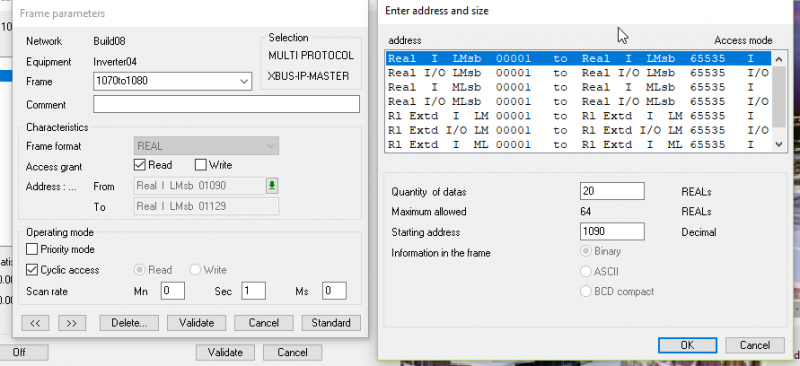
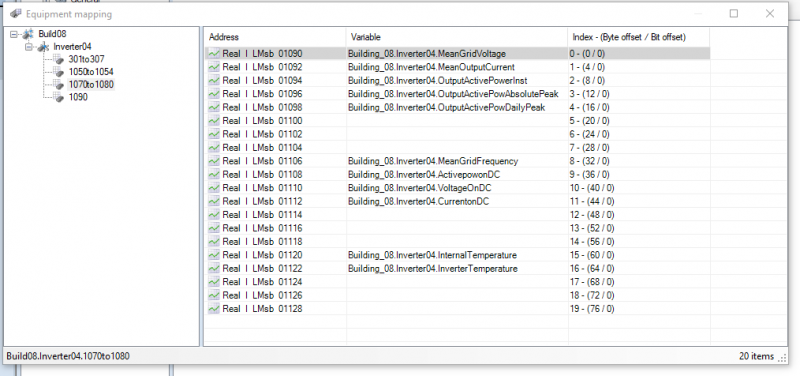
I dont know its a good method because inverter are not fully operational for verifying the data are good, expecting your remarks.
Screenshots
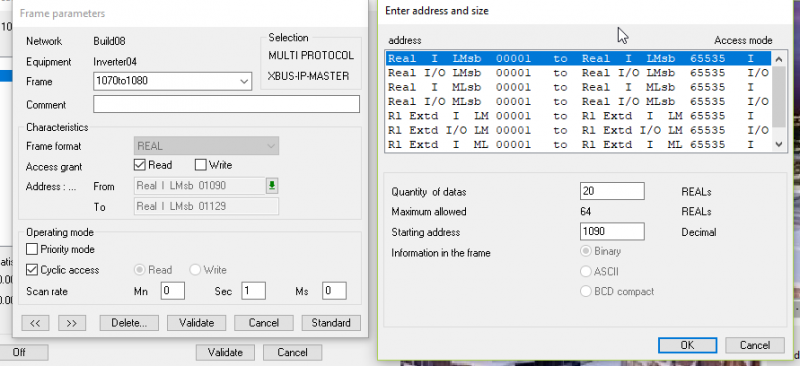
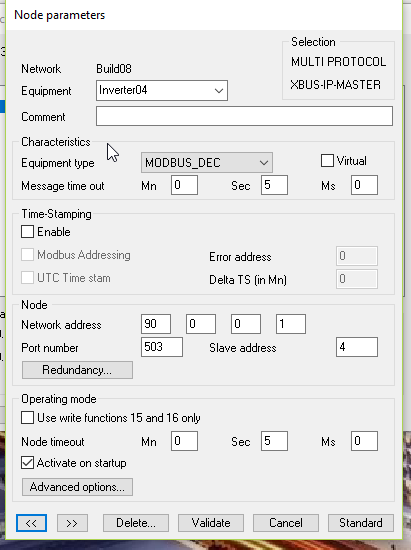
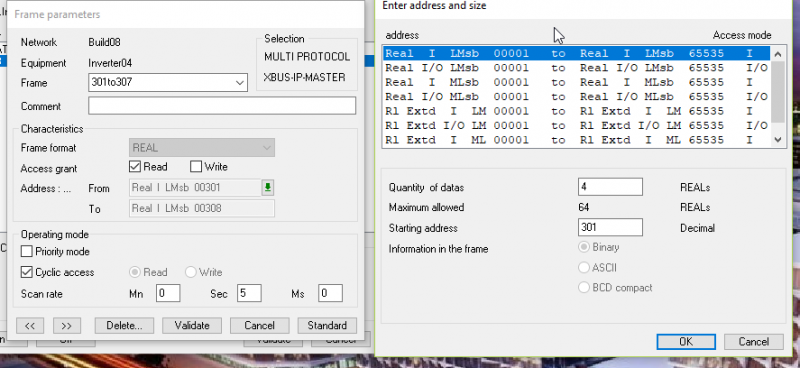
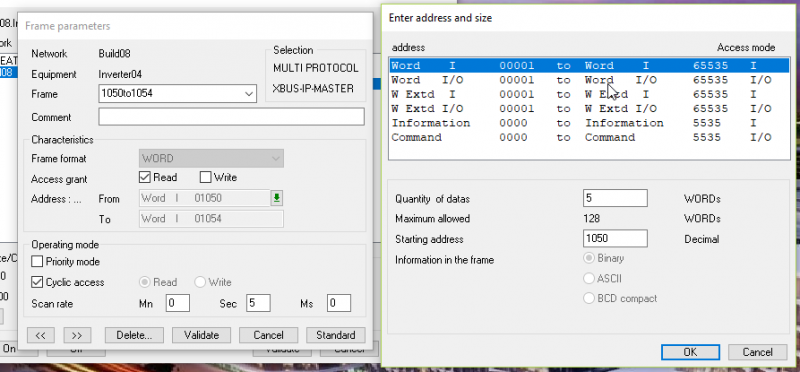
Thank you
Tijo
Posted : 24/05/2018 10:36 am
Hi Tijo
You must set the Message time out of your device to 0 and keep the Node time out to 5s.
The message time out as Edouard pointed out is to have a silence between to request so it impact the performance.
Regarding your frame I know what is wrong.
For the range between 0180 and 516 you must select Real I/O and not Real I (or Word I/O if you want to get integer value)
In the doc this range is under the title Holding Register
and the range 1000... is under Input Register.
Please check article KB441 for more detail about the function to use and the type of data to select.
Best regards,
Emmanuel
Posted : 24/05/2018 11:46 am
Let us know if it works now.
Thanks
Manu
Posted : 25/05/2018 11:08 am
Topic starter
Thanks Manu,
The site is busy with some other works, so we may go after 3 or 4 days. I will let you know once I check it.
Tijo
Posted : 25/05/2018 11:21 am
- 1
- 2