


more quick actions
minimize quick actions






Topic starter
Hello,
In last PcVue 11.1 the Automatic Login help says that we dont recommend using it now but we still keep the feature for compatibility.
But the format of WebIndex.html has changed (since 11.0 actually).
So, how to automatic login now?
Thanks,
Nico
Posted : 17/03/2015 11:11 am

Hi Nico, Please refer to this thread (dead link) for a description of the new format of WebVue startup attributes in JSON format. You can still use it in the same way for username and password:

This post was modified 2 years ago by LM
Posted : 17/03/2015 1:39 pm
Topic starter
Working well!
Thanks Armin
Posted : 18/03/2015 8:44 am
Hi
I tried it with
IE 11.0.9600.17690
PCVUE 11.1.5002
Windows 8.1 Pro (Remote desktop session)
But it doesn't work (works fine without auto login), no connection on event viewer, blank screen on IE
Any idea ?
Thanks?
index.html extract
var attributes = {
code: 'svfc/launcher/WebVueClient.class',
archive: 'AiWebVue.jar,AiTools.jar,AiTrend.jar,AiAlarmList.jar,AiLogList.jar',
codebase: '/classes',
width: '100%',
height: '100%',
align: 'baseline'
username: 'operateur_webvue',
password: 'web'
};
Posted : 30/06/2015 1:22 pm
Topic starter
Hi, I tried and I have the same result!!
OS: 8.1 sp1
Firefox 38.0.5
Pcvue 11.1 (last update) and 11.0 (last update too)
@Armin: What did we miss?
I am sure it worked before as mentionned in my last post on this forum....
Nico
Posted : 30/06/2015 1:52 pm
Topic starter
Java Logs:
Loadfile: dead link
resource time 11 1920X1080
Loadfile: dead link
Loadfile: dead link
GetIpAddress SecurityException!!!!!!!!
Loadfile: dead link
This post was modified 2 years ago by LM
Posted : 30/06/2015 2:03 pm

Hello,
I tried it right now with the most recent PcVue 11.1 update, Firefox 38 and the newest Java 8 release and it is working well after changing two small things:
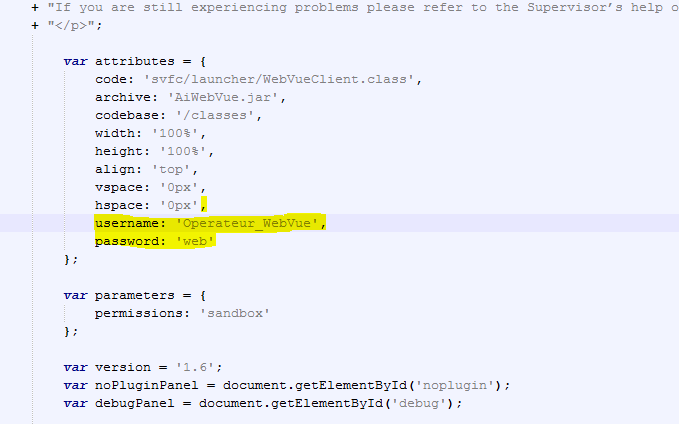
1. The username has to be case sensitive. So for the WebDemo_en project it should be "Operateur_WebVue"
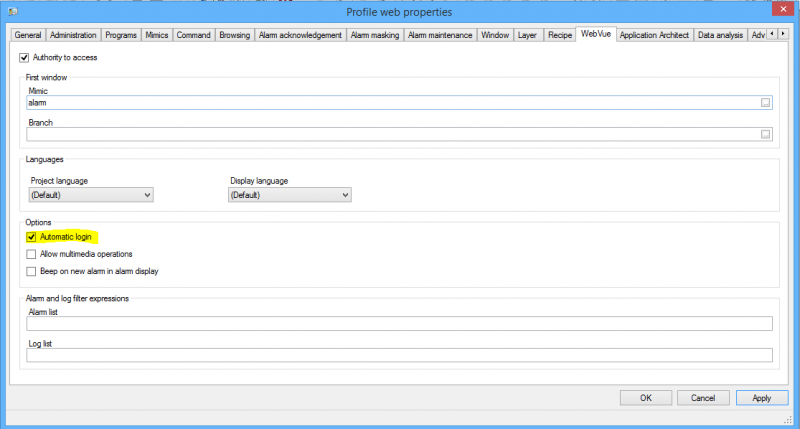
2. The "automatic login" function must be enabled in the profile
If the user profile has changed it is maybe necessary to restart PcVue and clear the Java cache. I was not able to figure out in which cases it is working directly and when it is necessary to clear the cache.
I hope this helps!
Best regards,
Daniel
Posted : 01/07/2015 5:34 pm
Topic starter
Hi Daniel,
That's a good news that at least 1 guy manage to make it work.
But, I did already exactly the same than you and it doesn't 🙁
Java version: 1.8.0_45-b15
Posted : 02/07/2015 7:32 am

Hi Daniel,
I tried too and I have the Nico result.
I didn't try with Firefox because we support only IE.
So I tried with IE : 11.0.9600
and 1st test :Java 1.7.0_17
2nd test :Java 1.8.0_45-b15
Can you send me your Index.html file to compare, please?
Posted : 03/07/2015 7:32 pm
Are there any news on this topic?
Nicolas P., is it working for you when following Daniel's guidelines?
Posted : 08/07/2015 3:11 pm
Hello!
After taking some time and do further tests I have maybe found the issue. It is mandatory to empty the Java, Browser and WebVue Cache after changing something. So here is a small guide how to get a working autologin environment:
1. Go to the user profile settings and enable "Automatic login" right in the WebVue tab.
2. Close PcVue
3. Open the index.html file in the PROJECTWEB folder with an editor of your choice
4. In this file you can find an attributes block, within this block add the following lines (Remark: Username/Password is case sensitive here!):
5. Delete the folder "cache" inside the WEB directory of the project
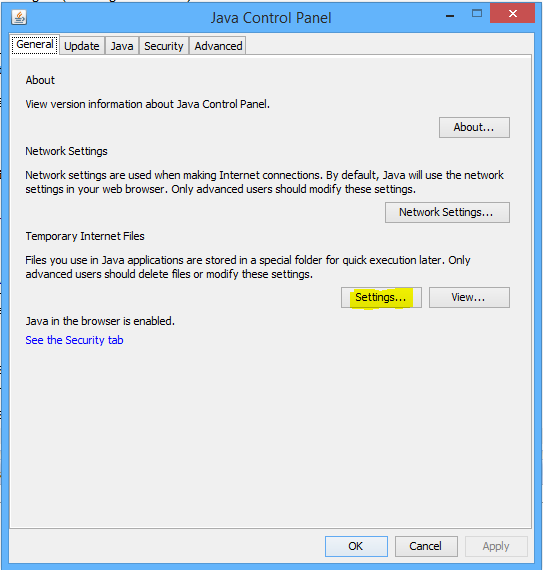
6. Open the java settings inside the system control panel and click on "Settings" for the "Temporary Internet Files":
7. In the next Dialog click the "Delete Files..." Button:
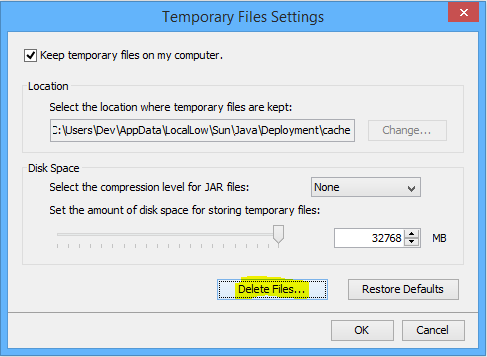
8. Check all boxes and confirm with "OK":
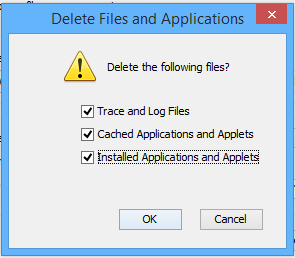
9. Go to the cache settings of your browser and also clear the browsers cache to be sure that the new index.html file is loaded.
10. Restart PcVue, a new cache directory containing the correct files for autologin will be created.
11. Automatic login should now work.
It is really mandatory to clear all caches after changing something in the profile settings or the index.html file.
I hope this helps you with enabling automatic login. Don't hesitate to contact me if emptying all caches is still not sufficient for you.
Best regards,
Daniel
PS: Here is my complete index.html file:
Spoiler
WebVue
body {
margin: 0;
padding: 0;
}
var no_plugin = "Welcome to WebVue !
n"
+ "n"
+ "n"
+ "The WebVue Java applet cannot be launched. The Java platform has either not been registered with your web browser or it is not installed on your system.
n"
+ "This component is required to run WebVue.
n"
+ "Before the first use of WebVue the Java Runtime Environment (JRE) needs to be installed.
n"
+ "
n"
+ "If the plugin is available on your platform but not activated you will see a message at the top or at the bottom of this page which allows you to activate the Java Runtime Plugin or the Java Deployment Toolkit right now.
n"
+ "
n"
+ "Otherwise, please proceed as explained in the following section...n"
+ "
n"
+ "n"
+ "n"
+ "n"
+ "Please install the Java Runtime Environment. It is available from the following sources:
n"
+ "
n"
+ "n"
+ "- n"
+ "
- On the Supervisor’s distribution media. (32-bit version only) n" + "<!--
- As a download from the WebVue Server (32-bit version only) -->n" + "
- As a download from Oracle's Web Site n" + "
n" + "As soon as the Java Plug-in is installed and activated, please click on the Refresh button.n" + "
n" + "n" + "n" + "If you are still experiencing problems please refer to the Supervisor’s help or contact your support agency.n" + "
"; var attributes = { code: 'svfc/launcher/WebVueClient.class', archive: 'AiWebVue.jar', codebase: '/classes', width: '100%', height: '100%', align: 'top', vspace: '0px', hspace: '0px', username: 'Operateur_WebVue', password: 'web' }; var parameters = { permissions: 'sandbox' }; var version = '1.6'; var noPluginPanel = document.getElementById('noplugin'); var debugPanel = document.getElementById('debug'); if (deployJava.isPluginInstalled()) { noPluginPanel.parentNode.removeChild(noPluginPanel); debugPanel.parentNode.removeChild(debugPanel); deployJava.runApplet(attributes, parameters, version); } else { noPluginPanel.innerHTML = no_plugin; debugPanel.innerHTML = '-- Information --' + 'Browser: ' + deployJava.getBrowser() + '
' + 'Installed JREs: ' + deployJava.getJREs() + '
' + 'Is Next-Gen plugin: ' + deployJava.isPlugin2(); }
Posted : 13/07/2015 2:02 pm
Sorry, I could not test it before today and now it works. I just check the case sensitive login (Thanks to Daniel), correct it and Automatic Login works well.
Tested on
Windows 8.1
PcVue 11.1 - 5002
JAVA build 1.7.0_71-b14
Internet Explorer 11.0.9600.17690
Posted : 13/07/2015 6:32 pm
OK With JAVA build 1.8.0_45-b15 too
Posted : 13/07/2015 7:02 pm
Hi,
Thx Armin.
I didn't delete temporary files.
This guideline is a good tools.
Posted : 15/07/2015 6:26 pm

To share my experience after a long TeamViewer session.
It was impossible to access locally to the customer's project through WebVue client, OK with a new project.
PcVue Version 10.0 Sp2 (R).
After a lot of tets, The WebVue autologin option was the issue in his project.
When unchecked, it worked fine.
Quite strange. I have tried the same with a 11.1 and there is no trouble.
Posted : 06/11/2015 7:27 pm
- 1
- 2