


more quick actions
minimize quick actions






Topic starter
Hi all
I have to update from PCVUE 8.2 to PCVUE 11.2 an application included an ocx to allow user select a folder or choose a name to save a file : this was done with an ocx Mscomctl.ocx or CommonDialog.ocx.
After install it is OK with W7 but it doesn't work at all with Windows10 (if ocx is added in the mimic nothing in VBA work - Msgbox for instance)
I hope someone have a solution....
Thks
Posted : 26/03/2018 11:59 pm

Hello Nico,
What do you mean?
msgbox "hello" doesn't work???
Can you send a sample project?
Posted : 27/03/2018 1:20 pm
Topic starter
Oups......After some attemps when you find the good ocx and register it : it's OK
I think PcVue should have some function in VBA or Scada Basic to allow user selecting file, saving file etc...without any ocx installation. Is it in the roadmap ?
Posted : 27/03/2018 11:02 pm

Hi Nico P.
No, so far, it's not in our roadmap. But I admit it is a good idea.
Maybe one day...
Nico K.
Posted : 28/03/2018 9:49 am

A good idea, a new scada basic function like:
mybuffer=Folder("Browse","All")
mybuffer=Folder("Browse","File")
mybuffer=Folder("Browse","Folder")
ret==Folder("Count"...
I will do the SPR 😉
Posted : 28/03/2018 12:20 pm
SPR64398
Posted : 28/03/2018 12:31 pm
Topic starter
Could you add something like
strFileName=FILE("SAVEAS"
to get the path and name of the file we have to save ?
Posted : 29/03/2018 11:59 am
Sorry Nico, I don't understand the purpose of this function.
Posted : 29/03/2018 1:25 pm
Topic starter
Imagine the user has to create a file or give a name to a file which will be created by PcVue . Then a dialox box as this one is needed
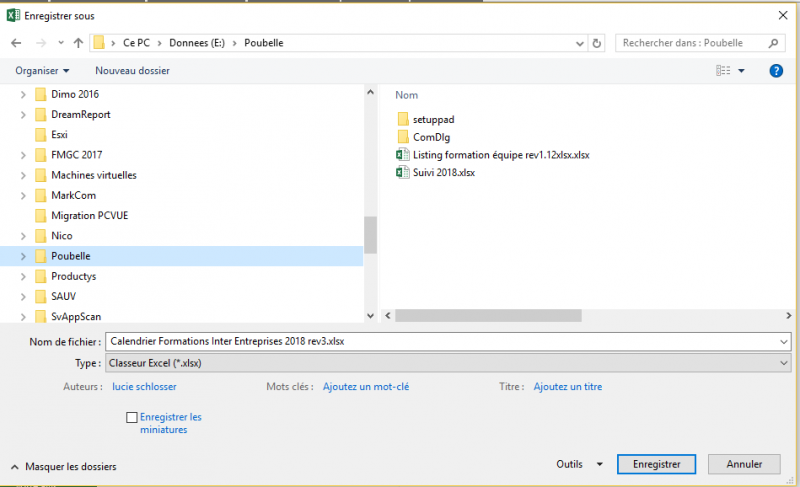
Posted : 29/03/2018 2:10 pm

To Create/Save a file, you have FOPEN.
But what kind of file do you want to manipulate ? And what for ?
Posted : 29/03/2018 2:16 pm
Topic starter
With FOPEN you have to pass the argument Path and Filename
FOPEN don't let you select your own file with the dialogbox
It is usefull for customer who create their own files needed by their process (CSTB Nantes don't you have work on it when you was young ???)
Posted : 29/03/2018 2:28 pm
So you want an new composent and not a scada basic verb.
Posted : 29/03/2018 2:31 pm
Topic starter
Is it more expensive ? :dry:
Posted : 29/03/2018 5:32 pm
For you, yes 😉
Posted : 29/03/2018 6:06 pm
Topic starter
Could you please see that with Mr Inguanez ?
:woohoo:
Posted : 29/03/2018 6:28 pm
- 1
- 2