


more quick actions
minimize quick actions






For demonstration purposes we are configuring snapvue with demo bms project which is already configured in VMware from France. But it shows the following error in the mobile. What is the problem?
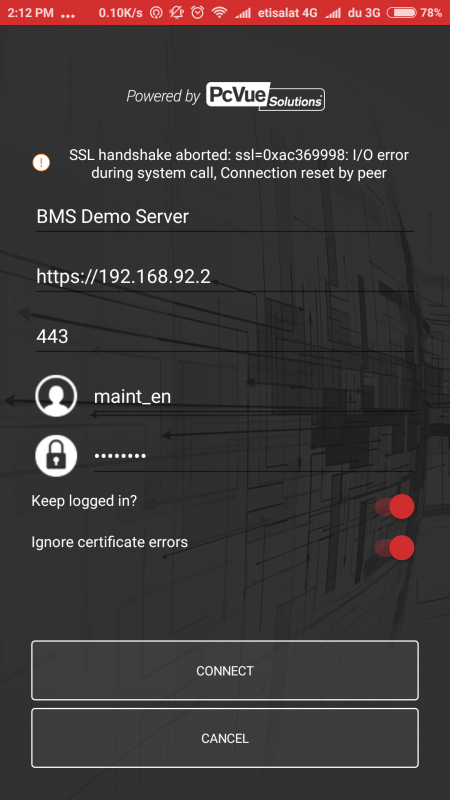
-Tijo
Posted : 26/04/2017 6:13 pm

Hello,
Did you change this settings into web.config file of C:ARC InformatiquePcVueBinWebServerExtensionsWebAppsWebClient:

It is to ignore certificate errors on server side, between PcVue and Web Service.
Posted : 26/04/2017 8:02 pm
It was flase, now I correct to True . But now the following error is showing.
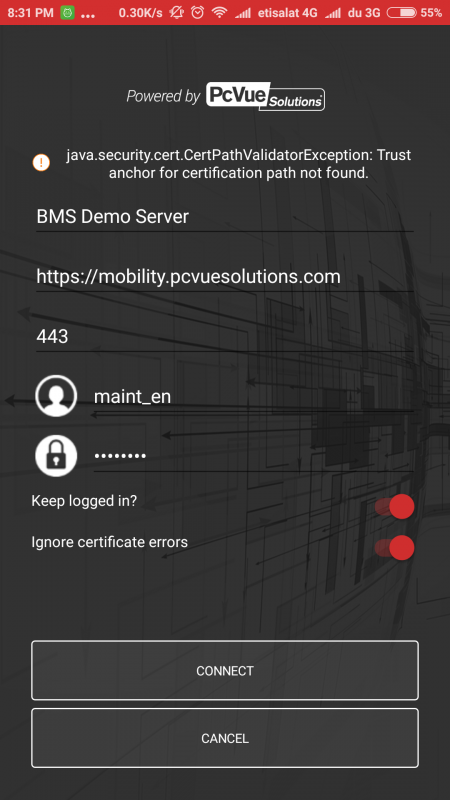
Posted : 26/04/2017 9:35 pm
The answer from Matti:
Go back from the page and open it again, with Ignore certificate errors (maybe switch it off and on before closing the page to be sure).
Then the connection should be successful, there seems to be some update problem with this option when I quickly tested.
(Meaning that it thinks still that the Ignore certificates was off).
Posted : 27/04/2017 5:18 pm
I got an error "WebVue Session,FAILED maint_en TOO_MANY_USERS" in the event viewer once i trying to connect SnapVue. Why these error?
The license which i have
General
Product : PcVue
Version : 12 (internal)
Type : SCADA Station
Mode : Complete
Size : Unlimited I/O
Expiration date : Thursday, March 29, 2018
Date of last use : Saturday, April 29, 2017
WebVue clients : 5
Web Services Toolkit clients : 5
TouchVue clients : 5
Data Acquisition
Communication channels : 5
BACnet : Yes
IEC 61850 : Yes
IEC 60870-5-104 : Yes
LonWorks/LNS : Yes
DNP3 : Yes
KNX : Yes
SNMP Manager : Yes
EtherNet/IP : No
Features
Networking : Yes
Data Export : Yes
Dynamic busbar coloring : Yes
Database Manager : Yes
Map control : Yes
IEC 60870-5-104 Outstation : Yes
SNMP Agent : Yes
Network Licenses
Network licenses : None
Posted : 30/04/2017 3:41 pm
It seems you don't have the good options, for example with a valid dongle you have:
General
------------------------
License number : 47004
Product : PcVue
Version : 12
Type : SCADA Station
Mode : Complete
Size : Unlimited I/O
Expiration date : Permanent License
WebVue clients : 5
Web Services Toolkit clients : 0
TouchVue clients : 10
---- SnapVue options ---- :
SnapVue clients : 100
SnapVue zones : Unlimited
SnapVue tracking : Yes
SnapVue messaging : Yes
Data Acquisition
------------------------
Communication channels : 16
BACnet : Yes
IEC 61850 : Yes
IEC 60870-5-104 : Yes
LonWorks/LNS : Yes
DNP3 : Yes
KNX : Yes
SNMP Manager : Yes
EtherNet/IP : No
Features
------------------------
Networking : Yes
Data Export : Yes
Dynamic busbar coloring : Yes
Database Manager : Yes
Audit : Yes
Map control : Yes
IEC 60870-5-104 Outstation : Yes
SNMP Agent : Yes
Network Licenses
------------------------
Licenses slot 1 : 5 licenses
Type slot 1 : N/A
Mode slot 1 : Complete
Size slot 1 : Unlimited I/O
BACnet slot 1 : No
WebVue clients slot 1 : 0
WST clients slot 1 : 0
TouchVue clients slot 1 : 0
Data Export slot 1 : No
Map control slot 1 : No
Licenses slot 2 : None
Additional Information
------------------------
Date : Wednesday, May 03, 2017 - 16:19:37
License Utility version : 12.0.0.20473
Drivers version :7.5.0
Dongle family: SuperPro
Dongle type : USB
Dongle Memory: 256
Posted : 03/05/2017 7:22 pm
Yes. I got the new license and now its working.
Thank you
Posted : 04/05/2017 1:51 pm