


more quick actions
minimize quick actions






Hello all,
how can I link the keyboard-button "BackSpace" to the mimic-open animation: "#P". I want to open the previous mimic by pressing the Backspace button on the keyboard.
Thank you
Sorry for the wrong category
Posted : 08/05/2014 2:58 pm

There is no action available that could be associated to a function key and that would correspond to #P.
Instead, I think, I would put an invisible rectangle somewhere onto the mimic and configure the keyboard shortcut.
Posted : 08/05/2014 6:18 pm

Hello,
Alternatively to what Armin suggests, it could be coding a SCADA Basic program
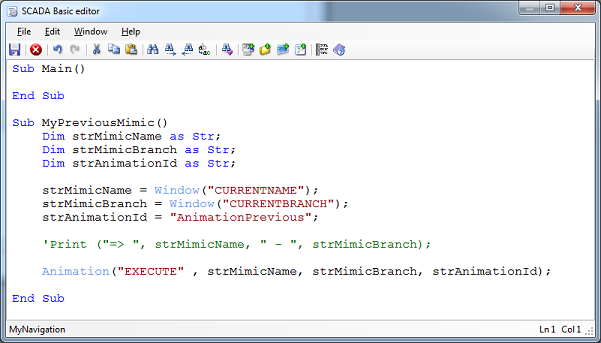
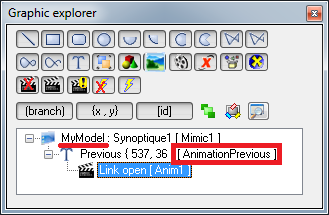
Including an animation (visible or not) in a mimic template
And configuring Backspace key
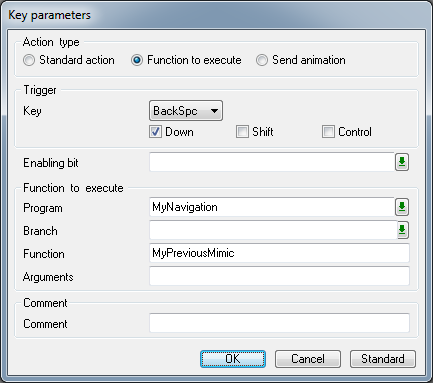
It will work quite well except with some mimics containing ActiveX
BR
Edouard
The project for PcVue 10
Posted : 09/05/2014 1:16 pm

I got the same request from a customer.
In case I tries the instruction Window("OPEN", "#P", "") but it doesn't work.
But I saw in the Scada Basic help the following:
Syntax 6 of WINDOW instruction
SETPREVIOUS
Moves the pointer to the previously opened window.
This selects the window that is opened with the next use of a Link-window open animation when using the substitution #P (open previous window).
It's not really clear. I tried different things but still didn't understand how it works.
Any experience of this instruction?
Nico
Posted : 11/11/2014 9:44 am