


more quick actions
minimize quick actions





Archive Data mgt
6
Posts
3
Users
0
Likes
38
Views

Topic starter
Hi.
A customer of mine is stuck because of the following error which occurs in the HDS traces:
2012/10/01,10:17:35.646,COMPUTER,user,HDS,E,0,0,COPCAccess::Connect __ Error when Attaching the OPCServer from IID_IUnknown Interface (80004002=E_NOINTERFACE)
2012/10/01,10:17:35.687,COMPUTER,user,HDS,E,0,0,CHisSrvSchema::InitOpc __ Error to connect on OPC Server 'SV.OPCDAServer' (80004002=E_NOINTERFACE)
2012/10/01,10:17:35.698,COMPUTER,user,HDS,E,0,0,CHisSrvSchema::StartExploit __ Init Opc failed, so StopExploitation ... (80004002=E_NOINTERFACE)
Also, the problem can be tracked in the opcsrv.log file: a client connects and immediately disconnects again just after.
DCOM permissions have been checked, but no matter which settings are applied the error persists.
PcVue version is 10.0 Update 1. The problem is reproducible on the customer's development machine (Win7 32 bit) and the on-site PC (Win 7 64 bit).
Posted : 01/10/2012 3:36 pm

Hmmm strange issue.
DCOM settings are not relevant as you are on the same station.
I would try to register the components in case the OPC server has a problem.
By the way did you check the OPC server settings in case...?
Do you have this issue even with an empty project having 1 variable configured as trend?
Posted : 08/10/2012 6:42 am

PcVue is not running as a service with Fire Deamon?
In that case HDS must be configured also to run as a service.
It is probably not the case since he is using Windows 7 but...
Posted : 08/10/2012 12:48 pm
Topic starter
No, it is a plain simple standalone station, not running as a service.
We already tried all the tricks:
- Register OPC server on startup (sv32.ini)
- Minimize security level (sv32.ini and DCOM settings)
- Checked for Windows Updates and Hotfixes (particularly, in regard to msado15.dll and OPC Core Components)
Accessing the PcVue OPC-Server with a 3rd party OPC client results in the following error message:
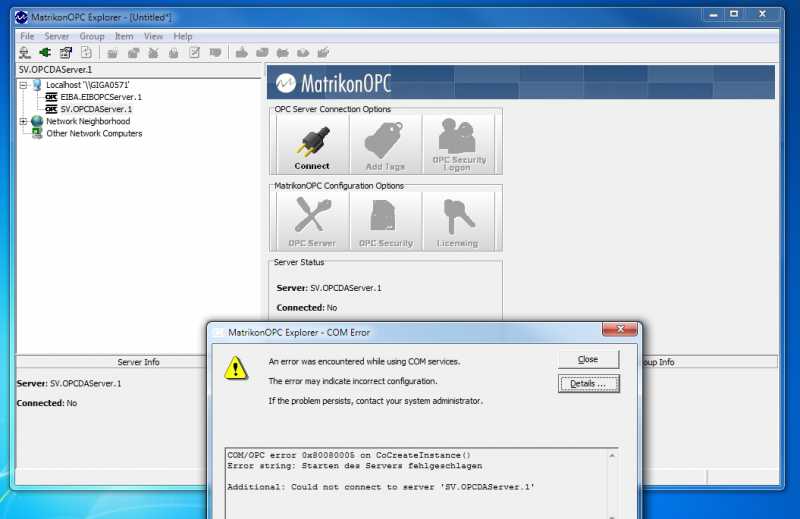

But frankly, I do not have a idea what could be the cause of this?
Only thing to try would be go back to DCOM configuration once again (although it should not matter according to NK) and completely turn off all security settings.
By the way: In the meanwhile we have tried with a newer PcVue version (10.0 sp1 beta 10044), but the symptoms stay the same.
Posted : 08/10/2012 2:02 pm
And can you connect MatrikonOPC Explorer to another OPC server?
What append with New PcVue project as NK said?
Posted : 08/10/2012 5:08 pm
Topic starter
No, could not connect to the EIB-OPC server either. Same for empty project....
It seems to be a general problem.
Further investigations from the customer draw a completely new picture of the issue:
1. Installation of PcVue on a brandnew machine with a pre-installed Win7 including the latest Windows Updates.
=> Problem is there.
2. Re-install Win7. Not applying Windows Updates.
=> Everything is working fine. Problem solved.
3. Install all the latest Windows Updates:
=> Problem is back again. OPC enum service is missing.
Seems to me like we will have to deal with one more destructive Windows Update...
But why hasn't this problem been detected with any other customer lately?
Posted : 08/10/2012 5:20 pm