


more quick actions
minimize quick actions





Communication interfaces
8
Posts
5
Users
0
Likes
61
Views

Hello All,
I have a question on how to retrieve the comtrade files (*.cfg) from an IED using IEC 61850 driver from PcVue.
It is a new feature improvement implemented recently in the Version 11.2 for the IEC driver. Any idea?
Posted : 03/11/2017 3:29 pm

Hi,
To "download" files from a IED, PcVue needs the 61850 file transfer services.
And you're lucky, it is already implemented in the v11.2 but in a test period.
So it is hidden for the moment.
Don't worry it is coming soon.
BR
Posted : 03/11/2017 3:37 pm

Very sooooon.
And not only for IEC 61850, but also for DNP3 (and IEC 104 in a later version).
Posted : 13/11/2017 7:02 pm

Thanks guys,
It's been 4 weeks 19 hours. Is it still very soon or already done ? 👿
Is the procedure to set up the download of *.cfg files from IED in IEC61850 driver already documented ?
Regards.
Posted : 12/12/2017 2:25 pm
Hi Cedric,
Maybe you don't know but there is a document named "planning review" which shows you the development state of a functionality 😉
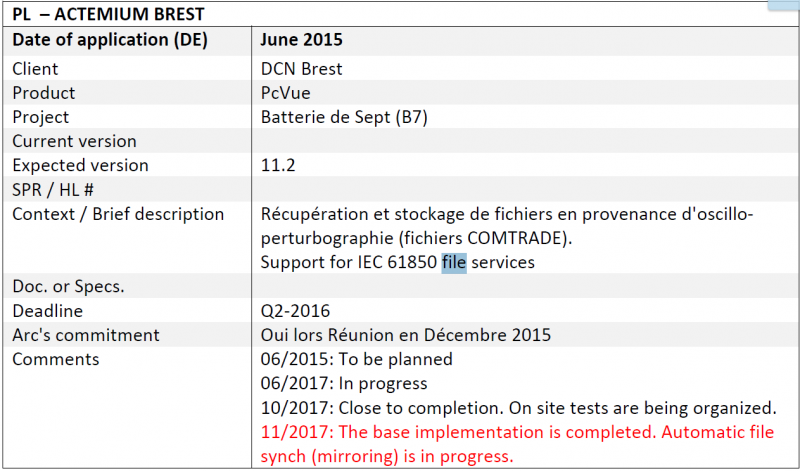
Here you can see an extract explaining that is not fully finished.
Regards
Posted : 12/12/2017 10:28 pm

Hi,
Just to complete the Brice's answer.
Yes, downloading a file (comtrade or other) is already possible.
And I think there is no document but I suppose it is quite straight forward...
@Brice: Could you basically give us the concept. Just basic.
I mean:
- Configuration part: Do we have to configure something?
- run-time: Download is done by scada basic or something else?
Also, does the IED Scout Simulator able to manage this function?
About the mirroring, according the name I suppose it is a way to have automatically a file downloaded. Am I right? If yes, is it done periodically or automatically every time the file changes in the device?
Finally, please just drop a message here when this function will be available.
Nico
Posted : 13/12/2017 8:17 am
PS : never heard about this planning review document...
Posted : 13/12/2017 9:19 am
Status to my knowledge:
The File Transfer services - download, upload and delete - are implemented for the IEC 61850 client, IEC 104 client and DNP3 client.
It is an experimental feature in most recent 11.2 updates (understand nightly builds for the latest fixes ;-).
Basic usage is via the Application Explorer and is not going to require 3 weeks of training.
Under the nodes corresponding to these drivers (Network level if I am not mistaken), you will find a task that corresponds to a 'File Transfer helper' in the same spirit than what was done for BACnet diag for automation objects. The rest is straightforward: Click, browse configured devices, browse files, upload, download or delete files.
Then comes SCADA Basic:
A new verb to support file transfer by script (FILE_TRANSFER or something similar).
Then comes background mirroring:
This one is still in progress on the R&D side. It consists in a few more settings (+the runtime) so that PcVue cyclically checks for new files at runtime, download and copy any new file to a predefined folder (local or file server on the SCADA side).
Some useful testing has also been done in the last 2 months, but Brice knows more about that than I do...
Posted : 19/12/2017 11:37 am