


more quick actions
minimize quick actions






Hi I need to launch the diolog box (F3) for the user accounts when PcVue is running as a service.
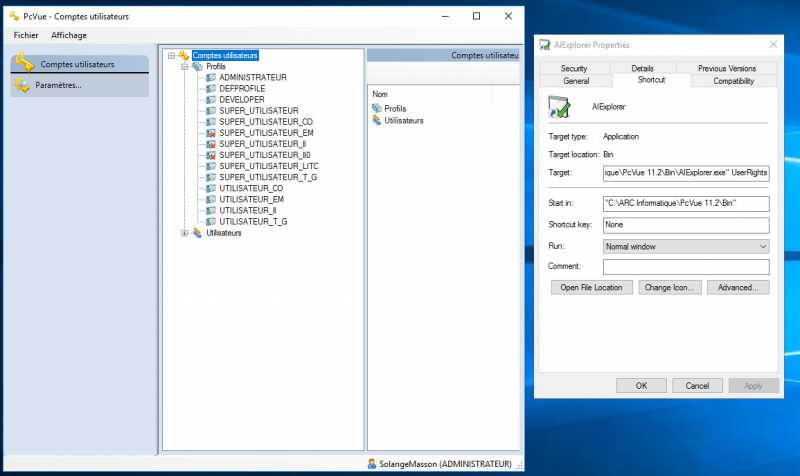
To do that I created a shortcut of AIExplorer with "-service" as parameter.
It's fonctionnal with a development licence but not with Runtime Licence.
With the runtime licence I have this message in French :
"Vous n'avez pas le droit de développement (fentres et configuration^) ou clé de licence développeur".
I use the same user account wiht my Runtime & Dev Licences.
Do you have a trick to launch user accounts with a Runtime Licence when PcVue runs as a service?
Thanks
Manu
Posted : 13/09/2018 4:05 pm

Hi Manu,
Did you solve your issue?
I am wondering why you are using -service in the shortcut.
Just use that: "AIExplorer.exe UserRights"
Nico
Posted : 26/09/2018 12:11 pm
Hi Nico,
I've not solved this issue and Anthony create the SPR 65248 for this.
It's seems working : but with this syntax : "C:ARC InformatiquePcVue 11.2BinAIExplorer.exe" UserRights
Now I think I've solved this issue. (but I haven't test it wiht a Runtime licence)
Thanks Nico, it helps everybody ! :woohoo: :woohoo: :woohoo:
Posted : 26/09/2018 5:34 pm
Yes of course the complete AIExplorer.exe path was implicit 🙂
By the way, your request remind me that I wanted creating a SPR to add in the documentation the different AIExplorer.exe command line options. That's done now!
In general, you can keep in mind that we can open the AE pointing to any object's category. Usually you just have to use the name you see in AE in english
Example: AIExplorer.exe OPC, AIExplorer.exe BACNet, etc...
Nico
Posted : 27/09/2018 8:22 am

For Data Export use : "C:ARC InformatiquePcVue 11.2BinAIExplorer.exe" Exports
Posted : 05/11/2020 4:13 pm