


more quick actions
minimize quick actions






Topic starter
Hi,
In a time table, I need configuring a complete day in the Scheduler meaning for example Monday 00:00 to Tuesday 00:00
Apparently it's not possible as the Scheduler rejects this configuration.
How to do?
Thx
Posted : 25/07/2014 2:35 pm

I thought you were the specialist :ohmy:
Posted : 25/07/2014 2:42 pm
Topic starter
Of Scheduler?
No way!
Web Scheduler for BACNet, yes!
Posted : 25/07/2014 2:59 pm

Hello,
That way:
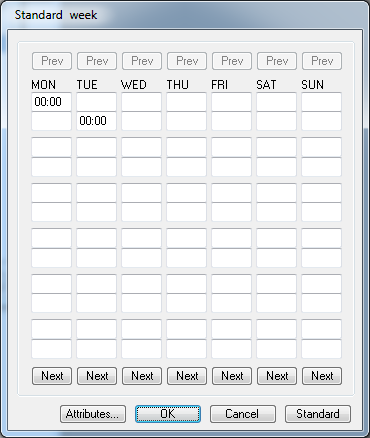
Posted : 25/07/2014 3:07 pm
Topic starter
Arrgh yes,
Thanks Edouard!
Posted : 25/07/2014 3:33 pm
Topic starter
OK but it doesnt really solve my issue.
Let's say we want 1 interval for each day of the week.
How to do?
Posted : 25/07/2014 3:36 pm

Hello,
I think you should talk with Loïck who is the time table/Websheduler expert !
see you
Posted : 25/07/2014 3:52 pm

Thank you Brice 😛
I don't really understand the configuration you want to do. As I understand, you want to activate the time table during all week. in this case we don't need a time table.
Posted : 25/07/2014 5:05 pm
Tell him what you need, Nico, he will tell you how to not use it 😆
Posted : 25/07/2014 5:13 pm
Topic starter
Yes Loik, we need a time table if we want managing special behavior for special days like public holidays.
So, here, we are stuck and we can't do it...
Posted : 31/07/2014 10:49 am
But we can do it in the other.
On cité des congrés de Nantes, they use timetable to create exception period on empty standard week time table. They use it to start CVC on one day.
In your case, you can use force to 0 option to stop timetable, and create those kinds of exception period
Posted : 31/07/2014 12:46 pm
Topic starter
Hi Loik,
What do you mean by "In your case, you can use force to 0 option to stop timetable, and create those kinds of exception period" ?
[EDIT]
OK, I think I understand. You mean: we keep the TT empty and configure the output bit "set to 0". In this case the bit will be always 1 because no interval has been created.
That's ok, it should work. The only "bad effect" I see is, when the user is created an exception, all intervals created are for "switching off". It's more natural creating an interval to "switch on".
But anyway, that's a solution. Thanks Loik.
Posted : 01/08/2014 6:39 am
Yes that was the idea 😉
You're welcome
Posted : 04/08/2014 2:39 pm