


more quick actions
minimize quick actions






Hello,
I got a crash from a customer who told me when he add a new node with some frames, and then he failed to re-launch the project. He used PcVue 8.2 on Windows XP and with modbus.
I reproduced the crash with the COMM.DAT of the customer's project as follow:
1. Use PcVue 10/9.0 to create an empty project, then close it;
2. copy the COMM.DAT to the C folder of the empty porject;
3. then launch the project, go to configure/communication/equipment, when click On to launch the communication,PcVue crashed.
4. Or go to Configure/Project/Settings, and then tick the Equipment on the start-up, then restart the project, I saw the message "No enough memory to allocate the buffer", then PcVue crashed. See the attached screenshot and the COMM.DAT.
Do you know what does it mean "No enough memory to allocate the buffer" and how can we increase the size of the memory(For cimway)? For my computer, the the size of the RAM is 4GB which is not so small.
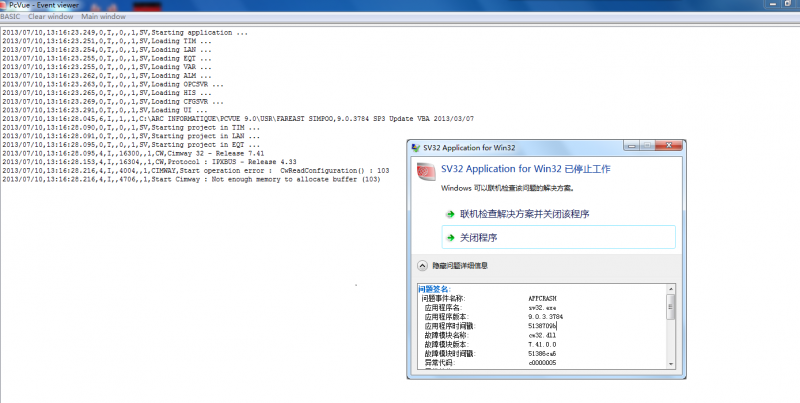
Posted : 10/07/2013 10:51 am

Hi Shu Quan,
Have a look on KB102
https://support.pcvuescada.com/index.php?option=com_k2&view=item&id=102:communications-limits-in-versions-before-700f&Itemid=198
By the way your zip file is invalid...
Posted : 10/07/2013 11:49 am
Thx, Nico.
I found nothing in the kB before I put the ticket, maybe I used the wrong key words...:(
I check the project, there are only 4 devices with less than 200 frames which does not reach to the limits of communication.
Posted : 10/07/2013 12:01 pm
So...
Crash => sv32exception => SPR
Posted : 10/07/2013 12:42 pm
SPR 48361 was created for this crash. 🙂
Posted : 10/07/2013 12:57 pm