


more quick actions
minimize quick actions






Hi all,
I got a call from a customer who is using Lonworks DDC, with more than 700 I/O, and they said "it took PcVue about 7 seconds to send the value to Lonmaker, after that the communication(Lonmaker->DDC->Device) is fast(proved by some trace tool). In the HMI, it seems PcVue does not response for a long time! "
If they create a new project with 1 output, the command is vary fast, or if they remove 1/3 of the 700 I/O, then the communication is fast(as fast as the polling interval) which does not cost PcVue about 7 seconds to send the value to Lonmaker.
They have checked the networking, architecture and found nothing, they dont think the problem relate to the polling mechanism.
There is no internet connected, so i could not get the project or trace etc.. I'm supposed to be check this issue tomorrow on the site.
Is there some tool to check the communication between PcVue and lonmaker? Have you experienced this kind of issue?
Thanks.
Posted : 27/05/2014 1:00 pm

Hi Shuquan,
First of all you must know something: PcVue NEVER communicates with LonMaker!
LonMaker is a configuration tool, that's all. Meaning, you don't really need LonMaker on the station where PcVue is running.
Actually, PcVue is communicating with the LonWorks LCA Object Server (or LonWorks Server) that is an Active X provided by Echelon.
Now, your case is quite typical. When you have 1 part (1/3) of the data everything is OK but with all data it's slow. Usually in this case the issue comes from a network saturation.
That's quite difficult to check but the best is to use a Lonworks Analyzer. Echelon provides one but not for free. So, you are talking about trace tool, which one is it?
First think to tune is the polling period. Do you know how much they configured. By default it's 10s that is quite fast.
I advise when you arrive on site to increase the polling period to 1mn and check if the write action takes a long time.
Checking a write action takes 2 steps:
1. Set the control and check in the device.
2. Set the control and check the value back in PcVue HMI.
Another point is to check if they configured many bindings. Bindings is like notifications done by the device and, if too much, can slow dramatically the network.
Also, check if they are not writing periodically some data (cyclic, expressions,...).
Finally there is the network itself. Is it Ethernet or serial?
If Ethernet they are probably using 1 of the routers as a gateway making the bottleneck (typical!).
Echelon proposes a solution (not free) to not have gateway's router in the architecture.
Finally, the real typical point is the one you wrote: "it took PcVue about 7 seconds to send the value to Lonmaker, after that the communication(Lonmaker->DDC->Device) is fast(proved by some trace tool)"
Yes, it's always like that because: LONMAKER doesn't have 700 points subscribed but only 1!
If your customer requests to LonMaker polling the 700 points he will have probably the same result...
Shu Quan, I advise you read the Lonworks help before going on site because you will have probably some troubles to understand all Lonworks terminology.
Posted : 27/05/2014 3:09 pm

Hi Shu Quan,
When using Lonworks protocol, KB509 is the first thing to know and apply.
BR
Edouard
Posted : 27/05/2014 3:22 pm
Thanks for you two experts, the problem was solved with the KB509.
The information yesterday i got is not correct enough. That's why i put "....". 😛
They used LonScanner Protocol Analyzer to analyse the communication, but within Ethernet. That's why they saw the bandwidth is normal.
Below is the network of the project:
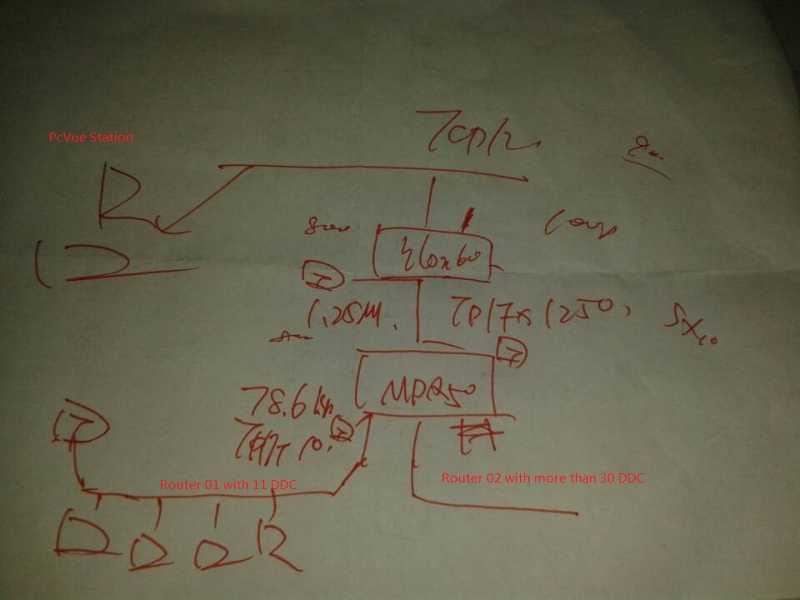
@Nicolas, do you remember that years ago, Lingling and Fengjian visited a site for a Lonworks communication issue of Technovator? In their case,there are two same PcVue stations, one station is ok, while the other one needs a long time to refresh data. They told me the issue was solved after re-installed the OS and LNS. The problem maybe they upgraded the LNS3.08 to LNS3.25 on that computer, and there maybe something wrong with the upgrading. Because after they installed LNS 3.25 directly on the new system, the issue did not occurred.
Posted : 28/05/2014 11:08 am