


more quick actions
minimize quick actions






Hi everyone, my customer can't communicatie with the OPC server when PcVue works as service. It wokks when it s as a desktop application. Do you ahve any experience with this. We tryied to add DCOM credentials with all siemens DCOM Components using our service account and we added the rights of this service account on all siemens folders in C:Program Files & C:Programm. And the result was so bas because after thos configurations, when PcVue runs as a desktop application, the OPC Server won't run, The customer has reinstalled his Siemens OPC Server and it 'works as a desktop but not as a service. Do you have any leads or experiences to solve that?
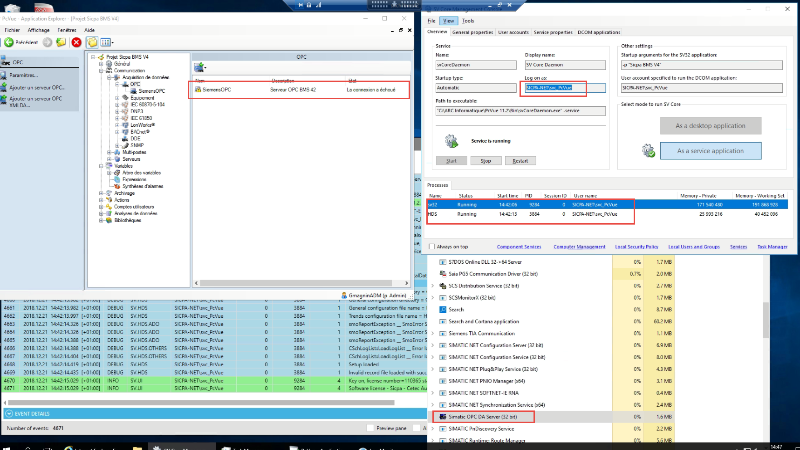
Thanks you & Merry Christmas.
This topic was modified 2 years ago by LM
Posted : 21/12/2018 9:18 pm

Hello!
I encountered same issue with Win911 (alerting software similar to ALERT).
In my case Win911 was OPC Client (running as a service) and PcVue (OPC Server) was running as a desktop app.
After struggling a lot we only found as a workaround to force WIN911 OPC Client to run as a desktop app, by launching and checking it via SCADA Basic script.
In your case I think you have to give up and launch PcVue as a desktop application... 🙁
I hope someone else has better news than mine... 🙁
Filippo
Posted : 23/12/2018 7:51 pm
I hope so too.
thank you Filippo
Posted : 07/01/2019 4:07 pm
a little update.
My customer ask Siemens and it seems there is a configuration to run this opc server as a service.
I will update this post if I have the trick
Posted : 16/01/2019 8:08 pm