


more quick actions
minimize quick actions






Topic starter
Hello everybody.
Some time back in PcVue 10.0 SP2 there was a modification that changed the way users can logon to PcVue by using their local Windows accounts (see SPR #16946 for details...). I am trying to figure out how it works right now.
What I want to achieve is to map local Windows user groups to PcVue profiles on a computer that is in a domain for automatic logon with local Windows user accounts.
On a computer that is not part of a domain I have started with an empty project and ticked "Enable Windows directory" and "Auto Logon".
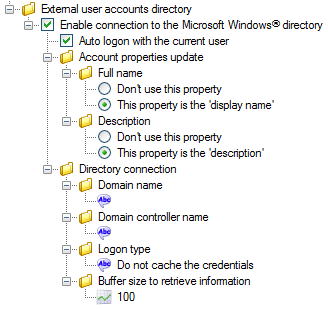
Then I moved to the profile configuration and found out that there is only one single user group that I can associate to the profile. A virtual(?) group called "None". The other local user groups are not visible. When I associate the group "None" to the DEFPROFILE, everything works fine. I restart PcVue and I am correctly authenticated with my local Windows account.

On the other hand: on a computer that is in a domain I see all the domain user groups, but not the local Windows users groups and not the mysterious "None"-group.
Can anybody explain to me these strange observations?
Why can't I see and select the local Windows user groups?
Am I missing something about how I can realize what I am trying to achieve?
Posted : 12/07/2016 4:28 pm

Hello Armin!
I follow your interesting question: I never heard before the possibility to use this feature with local user accounts instead than domain users.
What I reminded reading your post is that there's a big difference if your PC is under domain or if it's a domain controller: when a Windows server is promoted to be domain controller, the server no longer uses the local account (Security Accounts Manager [SAM]) database during normal operations to store users and groups. The SAM database is present, but it is inaccessible when the server is running in Normal mode. The only time that the local SAM database is used is when you boot into Directory Services Restore mode or the Recovery Console.
Just to be sure: Where you made your AD domain test? In a PC under domain or into a domain controller?
Posted : 13/07/2016 12:36 am

Hello Armin,
I did a qualif. for User Rights and had a test specifically with Windows Local users.
You may refer the SPR related to this although it is fixed http://10.0.0.14/PortailSPR/AnomalieConsultation.aspx?IDanomalie=61335 for the spr and the screenshots on the ftp.
Hope this helps.
@Filippo Ciao, can I have your cat! 🙂
Posted : 13/07/2016 8:12 am
Topic starter
Some further clarification:
Tests have been made on three different computers. None of them is a domain controller.
Test #1: VM on my own computer. Not in a domain.
=> Group "None" is visible. No other local Windows user groups are visible. I can logon to PcVue with my local Windows user account.
Tests #2 and #3: Computer of the inegrator and on-site computer. Both are in a domain. We try to associate local Windows user groups to PcVue profiles.
=> Group "None" is not visible. Only domain user groups are visible.
Posted : 14/07/2016 1:53 pm
The qualification done was on the "test #1" scenario. Will try the other tests sometimes and get back to you with the results.
Posted : 14/07/2016 2:04 pm
Topic starter
Hello Abdul,
Have you found the time to do the tests?
Posted : 03/08/2016 1:26 pm
Hello Armin,
Yes, I did but I forgot to update this thread. :sick:
Tests #2 and #3: Computer of the inegrator and on-site computer. Both are in a domain. We try to associate local Windows user groups to PcVue profiles.
=> Group "None" is not visible. Only domain user groups are visible.
I did and created a local user Local01 while connected to our local domain [pcvue.com.my], I added all possible profiles on my Domain account pcvue.com.myasrasidi.
Then I switched user to the .Local01 and I got this when I launched the project.

I tried finding the group while logged on as .Local01 , no groups whatsoever.

Posted : 03/08/2016 2:22 pm
Topic starter
So... bug or no bug?
Posted : 03/08/2016 2:56 pm
It is a bug and I will make an SPR for this.
Posted : 03/08/2016 3:16 pm
It seems whenever PcVue running on PC under a domain, it does not scan the local groups, only the domain groups.

SPR Number 62504
Posted : 04/08/2016 12:52 pm