


more quick actions
minimize quick actions






Hi,
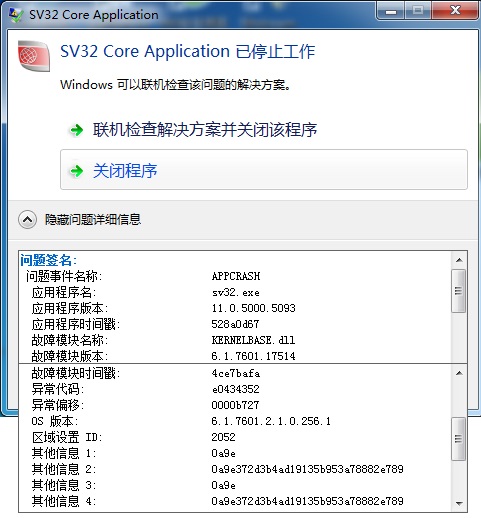
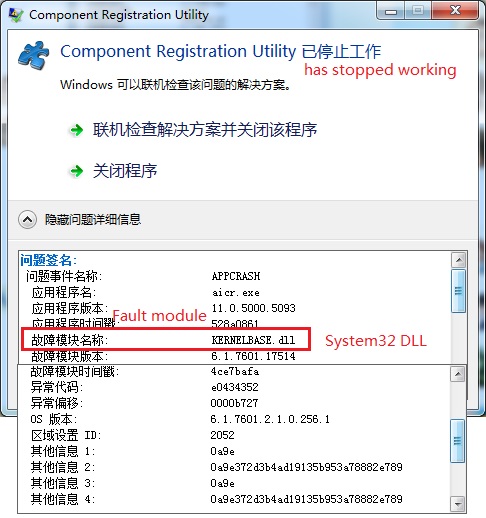
I got a call from a customer who could not launch PcVue 11.0 release/Component registration after his Windows 7 Ultimate(Chinese, 64 bits) installed the updates from Windows update. Before that, PcVue runs well on the computer. Even he re installed the PcVue, he still could not launch PcVue 11.0.
See below the screenshot:
1. when launch PcVue: PcVue has stopped working.
2. when launch Component registration: has stopped working.
Do you have some idea?
Posted : 27/03/2014 3:00 pm

No idea but, at least, your customer could come back using a Windows restore point...
Posted : 27/03/2014 3:05 pm
Unfortunately he did not create one....
Posted : 27/03/2014 3:21 pm
I think it's automatically done by Windows.
By the way, I advise your customer uninstall/re-install PcVue
Posted : 28/03/2014 7:50 am
He tried to uninstall/re-install PcVue 11.0, and had the same result.
I suggested him to try with PcVue 10.0 on that machine, and PcVue 10.0 did not have this issue!
Posted : 28/03/2014 10:22 am

Hello,
Maybe thanks to the update history, you can find which updates are the cause of these problems.
I think it can help us.
Posted : 31/03/2014 5:35 pm
Hi Brice, Yes, finally we un-installed all the updates and then re-updated the OS, and then PcVue 11.0 works again. But we still don't know why or which update caused the problem. 🙁
Posted : 01/04/2014 3:07 pm
Hi,
I met another PcVue crash after some windows updates installed on windows 7, 64bits, Chinese, Ultimate.
1. launch PcVue 11.0, it opens a windows Office plus installation message box, see below:

2. after the office message box disappear or if we cancel the installation, then PcVue disappears.
3. but this time we can see some crash log in the log, it said the manager is Start-up:
2014/04/17,13:29:02.977, ######## EXCEPTION: 0xC0000005 at address: 0x00000000: ACCESS VIOLATION read attempt to address 0x00000000
Callstack dumping
Message Dump processed:
Type = Request
Function = 0
Source manager = StartUp
Destination manager = StartUp
Source station = 0
Destination station = 0
1: 0
1: 1
1: ERROR: SymGetLineFromAddr64, GetLastError: 487 (Address: 65013864)
1: 65013864 (VBE6): (filename not available): DllVbeInit
1: 2
1: ERROR: SymGetLineFromAddr64, GetLastError: 487 (Address: 77661BA9)
1: 77661BA9 (ntdll): (filename not available): RtlUnicodeToUTF8N
Posted : 17/04/2014 11:36 am
To my mind it is a vba problem.
I met the same problem with Customer computer where different version of office are installed.
I think a good solution is to re-install vba component from PcVue DVD :
- DVDSvPackagesVba65vbaof11.msi
- DVDSvPackagesVba651033vbaof11i.msi
others things that you can check are the Windows logs. Maybe you can find interesting information.
Posted : 23/04/2014 7:26 pm

Hello
I have the same problem with one Training VM. I uninstall and reinstall PcVue and it is OK.
Posted : 23/04/2014 9:29 pm