


more quick actions
minimize quick actions






Hi everyyone,
one of my customer says to me that he has issues with multiregions in PcVue when one (ore more) screen is shutdown or in stand-by mode and when it returns ON.
At this moment PcVue works only with one region. It's like PcVue losts its multiregion configuration.
Today, the only way found by my customer to run again PcVue in multiregion mode, it's to restart PcVue.
Do you know this issue and do you have a solution/workaround to solve it without restart PcVue and without changed the behaviours of the screens?
Thank you
Manu
Posted : 25/04/2018 1:43 pm

Hello, I copy here a mail sent by Nico D., dealing with the loss of a screen. See also KB843 CONTROLLING THE WORKSPACE USING VBA.
Hope it will help you:
Grégoire
Control workspace with VBA
You know it happens that workspace size changes in runtime, main reason is when we lose one screen on a multiscreen project. When screen comes back it is quite impossible to restore the workspace size without shutting down and restart PcVue.
In latest versions (11.1 update , 11.2 update) we have a new VBA event that is raised when workspace resolution changes (on the project object)
Picture 1
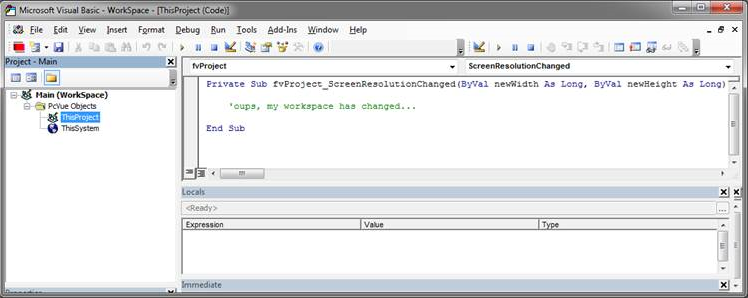
And two new methods have been implemented, RestoreWorkspacePosition (that restore the startup resolution and position), and SetWorkspacePosition allowing full customization.
Picture 2:
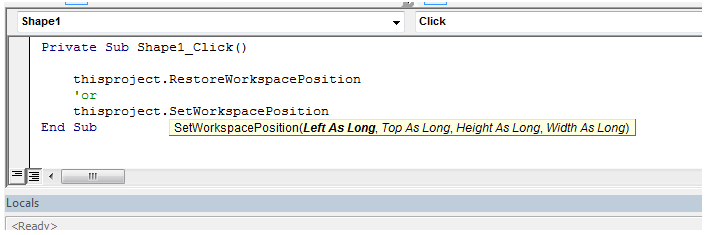
With the combination of the event and the two new methods you should handle now workspace size and position.
Posted : 27/04/2018 6:34 pm