


more quick actions
minimize quick actions






Topic starter
Dear guys,
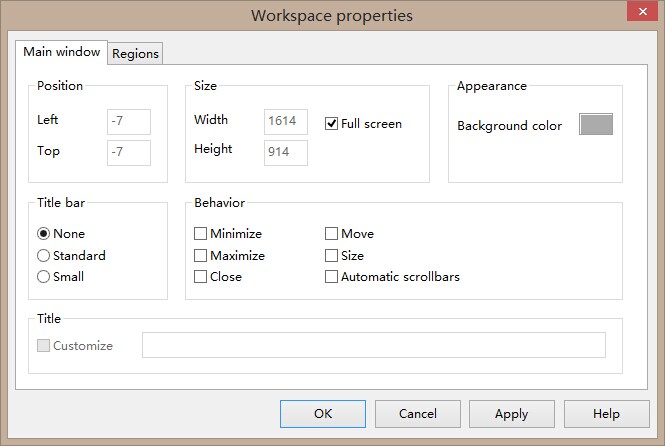
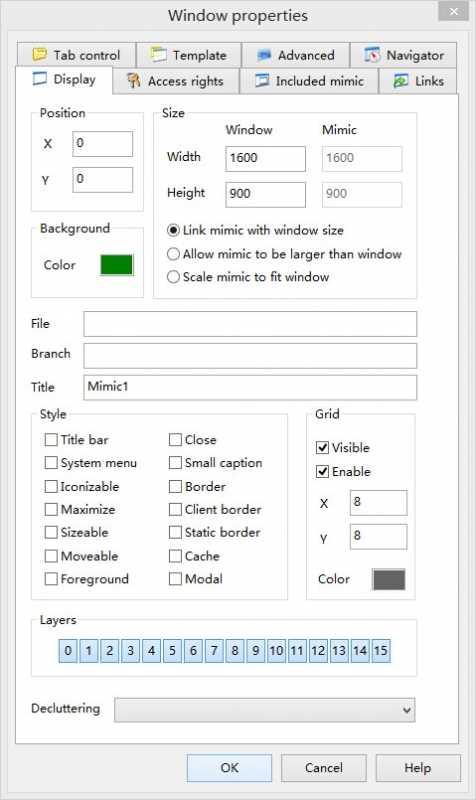
Do you know how to hide the gray border of a mimic when the resolution of the mimic is same with system resolution?

BR,
Mark
Posted : 30/07/2014 9:16 am
Topic starter
Maybe the third picture is not clear, I attached a new one.

Posted : 30/07/2014 12:41 pm

Hello Mark,
The only way I found is to launch this scada basic script at project startup:
Sub Main()
Window("MAIN", -5, -5, 2000, 1000);
End Sub
Posted : 30/07/2014 1:10 pm

Meaning, looks like the trick is to not remove the gray border but just shifting the workspace hiding it!
Posted : 31/07/2014 5:48 am
Topic starter
Thanks,it can satisfy customer's requirement.
And the customer also find another trick(VBA) to do this:
Option Explicit
Private Declare Function SetWindowPos Lib "user32" (ByVal hwnd As Long, ByVal hWndInsertAfter As Long, ByVal x As Long, ByVal y As Long, ByVal cx As Long, ByVal cy As Long, ByVal wFlags As Long) As Long
Private Declare Function FindWindow Lib "user32" Alias "FindWindowA" (ByVal lpClassName As String, ByVal lpWindowName As String) As Long
Const HWND_BOTTOM = 1
Const HWND_NOTOPMOST = -2
Const HWND_TOP = 0
Const HWND_TOPMOST = -1
Const SWP_NOSIZE = &H1
Const SWP_NOMOVE = &H2
Const SWP_NOACTIVATE = &H10
Const SWP_SHOWWINDOW = &H40
Private Sub fvProject_StartupComplete()
Call SetBorder
End Sub
Public Function SetBorder() As Boolean
SetBorder = SetWindowPos(FindWindow(vbNullString, "PcVue - Main window - ARC Informatique"), HWND_NOTOPMOST, -3, -3, 2000, 2000, SWP_SHOWWINDOW)
End Function
BR,
Mark
Posted : 01/08/2014 8:09 am
Or "why making simple if you can make complicated"
Ludo solution: 1 line using internal instruction
Window("MAIN", -5, -5, 2000, 1000);
Customer solution: 20 lines using external system dlls
:cheer: :cheer: :cheer:
Posted : 01/08/2014 4:31 pm
Topic starter
God knows, maybe the customer wants to show his ability of using VBA. :cheer: :cheer:
Posted : 04/08/2014 6:33 am