


more quick actions
minimize quick actions






Topic starter
Hello,
A customer asked for our feedback when using a RDS client with multiple screens.
I have made a platform and it seems to be working quite well.
Of course, we have to care about the requirements specific to PcVue and multiple screens (regions):
- workspace configuration
- PcVue HMI options
- system power options
- ...
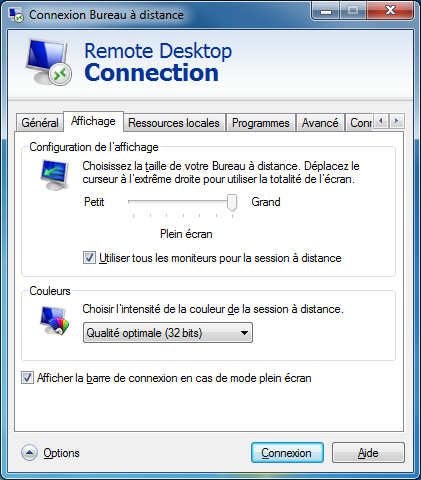
As far as the system really detects multiple screens, the Microsoft RDS client has the possibility to go further.
Here are some screenshots:
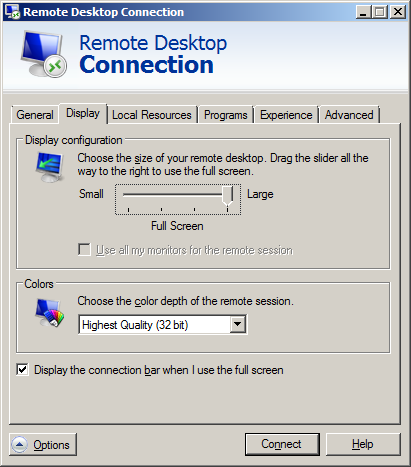
When single screen detected
When multiple screens detected (French dialog box)
Do you have customers already using RDS client that way?
Any other feedback?
Thanks
Edouard
Posted : 23/06/2014 7:56 pm

Good to know.
Thanks Edouard
Posted : 24/06/2014 6:52 am

Hello Edouard
I confirm that RDS client works with multiple monitors.
I tested it few months ago.
Here a documentation (sorry in French) : http://blogs.codes-sources.com/coq/archive/2010/07/22/support-du-multi-crans-dans-le-client-bureau-distance-remote-desktop-services-ex-terminal-services.aspx
Multiple monitor support. Remote Desktop Connection (RDC) 7.0 and Windows Server 2008 R2 enable support for up to 16 monitors. This feature supports connecting to a remote session with any monitor configuration that is supported on the client computer. Programs function just like they do when they are running on the client computer.
Posted : 24/06/2014 12:20 pm