


more quick actions
minimize quick actions






Topic starter
Hi guys!
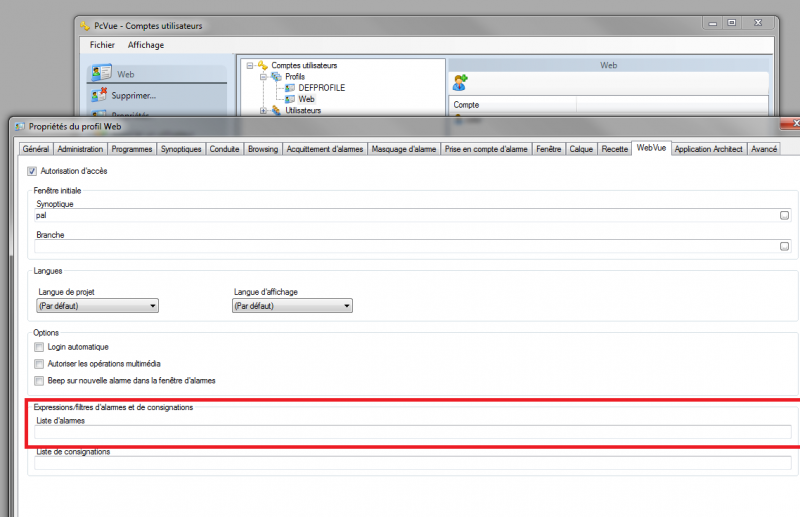
Did you use this webvue option?
I tried and tested in my webvue client and it did not work.
For example, I used several alarms with Domain01 in Domain.
So I put this line in the red rectangle: SQL CMDE=[Attribute01] = 'Domain01'
There is no more information on this option in the PcVue help.
I know GpConf.dat file but my customer wants a automatic filter on the alarmviewer when he enters in Webvue.
I am not sure that we can do it...therefore I tried to use this option.
Posted : 22/10/2013 1:32 pm
Topic starter
Ok it's fine.
It is easy = it is PcVue 😛
In fact there is nothing in the PcVue help on this option. (SPR 58953)
I put SQL CMDE ... like in GpConf.dat, but in PcVue we need only put directly the name of the domain.
So this option uses only a domain filter.
Do you know the syntax of this option to filter on Nature for example? I think that there is nothing.
Moreover and for your information, there is a new SPR (58955) because if you enter in the alarmlist a unknow domain. In webvue you keep the last configuration and there is no error message to display that your domain filter is unknown.
Posted : 24/10/2013 3:01 pm

Did you ask Bruno ?
Posted : 24/10/2013 11:55 pm
Topic starter
Hi everybody,
I asked Bruno.
So this is his answer:
In the alarmlist you can put the same filter name of a Gpconf.dat file.
For example if you have:
In Gpconf.dat file:
[FILTERDomain01]
Description=Domain01
Sql Cmde=[Attribute01] = 'Domain01'
[FILTERDomain02]
Description=Domain02
Sql Cmde=[Attribute01] = 'Domain02'
[FILTERNature01]
Description=Nature01
Sql Cmde=[Attribute02] = 'Nature01'
[FILTERNature02]
Description=Nature02
Sql Cmde=[Attribute02] = 'Nature02'
You can put Domain01 or Domain02 or Nature01 or Nature02 in AlarmList in the webvue option of PcVue profile.
But I tested with PcVue 10 SP1 update 47 and only the domain filter works. So I create SPR#59075
Posted : 04/12/2013 11:36 pm

To my mind, you like to create SPR 😉
Posted : 05/12/2013 11:12 pm