


more quick actions
minimize quick actions






Topic starter
Hello,
When trying to make WebVue work and diagnose step by step the customer has this error message
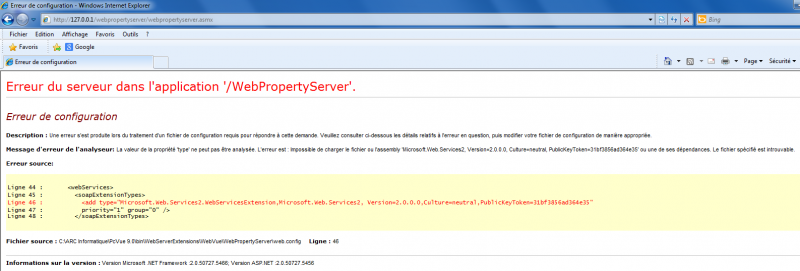
Did someone meet something similar.
With the same PC, it works fine with SessionContext/SessionContext.asmx !
Regards
Edouard
Posted : 06/08/2013 12:17 pm

Hey,
could you compare with the file in your computer ?
Posted : 06/08/2013 12:39 pm
Topic starter
Hi Brice,
It was exactly the same file than mine.
Regards
Edouard
I wrote this topic in order to give an answer other than KB501 😉
Posted : 06/08/2013 12:47 pm
Is it something like "The question of Friday" ?? 😉
Posted : 06/08/2013 12:58 pm

Edouard:
Have you checked in the IIS configuration if the Application Pool used by the WebPropertyServer is "SV.NET 4.5" and not "SV.NET 4.5 (Classic)" ???
This has been an issue in all 11.0 beta versions prior to 11.0.02023.
EDIT: Ooops, wait. This is not a version 11.0 project actually, or is it?
Posted : 06/08/2013 1:02 pm
Topic starter
Hi Armin,
He is using PcVue 9.0 Sp2 with Windows 7 (x86 x64? I am not sure) let's says x64
We have installed Java 586 available on the DVD
We have made aspnet_regiis.exe -i in admin mode
We have checked .NET 2.0....
Unfortunately, no TeamViewer or equivalent possible 🙁
Regards
Edouard
Posted : 06/08/2013 1:09 pm
Hm, apparently it is a problem with the WSE:
http://msdn.microsoft.com/en-us/library/ms824619.aspx
Could you try to reinstall "Microsoft WSE 3.0.msi" from the PcVue disk?
Also, please check again which application pool the WebProperyServer is using...
Posted : 06/08/2013 1:18 pm
Topic starter
Thank you Armin,
I am waiting for the customer to call me back.
I will keep you informed
Posted : 06/08/2013 2:37 pm
Topic starter
The issue is fixed!
Here is how it was solved :
- Uninstall of WSE 3.0
- Reboot
- Install of WSE 3.0 PcVue 9.0 DVD version (a mode is asked. We have chosen Runtime)
- localhost/SessionContext/SessionContext.asmx works fine (ok with 127.0.0.1 also)
- localhost/WebPropertyServer/WebPropertyServer.asmx does not work (neither with 127.0.0.1)
We keep on going (but not self confident)
- Uninstall of WSE 2.0 SP3 Runtime
- Reboot
- Install of WSE 2.0 SP3 Runtime - PcVue 9.0 DVD version
=> All is OK (SessionContext, WebPropertyServer). WebVue project also
Thank you
Posted : 06/08/2013 7:52 pm