


more quick actions
minimize quick actions






Topic starter
Hi Guys,
I have a strange issue in one of my customer.
He is using V11 06010
Clicking the login button in WebVue doesn't have any action. I mean really nothing happened.
Any similar experience?
Nico
Posted : 02/12/2014 9:11 am

Hi Nico,
What exactly do you mean with "nothing happened"? Does this imply that not even the login dialog disappeared? This would be really awkward.
Generally speaking: yes, we have a lot of experience with debugging WebVue at this stage, for example just refer to the recent topic started by Edouard.
The point is that this is a crucial point in making WebVue run because when clicking OK in the login dialog we initiate the connection to the PropertyServer and thus to PcVue. Before we only download individual files from the web server. This is where the services exchange starts.
The regular way to debug this kind of issue is the following:
- Check the output of the Java Console.
- Check that the WebPropertyServer is directly accessible from the web browser.
- Check the Windows event log for possible errors of the ASP.NET worker process (w3wp.exe).
- Check the webvue.dat file for possibly deprecated entries. In first place I am thinking to enabling the setting ProxyServer when using a recent version of the Java Runtime Environment ( > Java 8 ).
- Try to connect to the web services with the WST validation tool (or the web portal demo alternatively) and check for possible errors.
Posted : 02/12/2014 2:06 pm
For your information:
The answer to the problem was
...enabling the setting ProxyServer when using a recent version of the Java Runtime Environment ( > Java 8 )...
Please remember to check this setting in the webvue.dat when updating to Java 8! The option ProxyServer must be set to 1. The value 0 for this setting is deprecated.
Posted : 03/12/2014 2:26 pm
Topic starter
Yes, that's solved the issue.
Thanks Armin.
Shouldn't be a good idea setting this proxy server by default for V11.1 ?
Posted : 03/12/2014 3:23 pm
This is what we are doing, in fact B)
Posted : 03/12/2014 3:27 pm
Topic starter
Boooh! I am again in this situation but the source looks different (ProxyServer option is equal to 1).
My version is 11.0 06054
I activated the console and can see this message:
Exception in thread "AWT-EventQueue-2" java.security.AccessControlException: access denied ("java.net.SocketPermission" "127.0.0.1:80" "connect,resolve")
at java.security.AccessControlContext.checkPermission(Unknown Source)
at java.security.AccessController.checkPermission(Unknown Source)
....
Actually, one of my customer had the same issue last week. It solved the issue by requesting using applet V7.xx but anyway it was not so clear actually.
How to solve this "Access denied" issue?
Posted : 17/03/2015 11:04 am
Hi Nico,
Can you please check if in your index.html file the paramters object contains the permissions property and that it is set to "sandbox"?
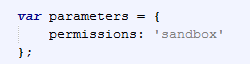
Second: Could you please check if there are any constraints regarding file access permissions for the w3wp-process for files in the /WEB folder of your project?
Posted : 17/03/2015 1:45 pm
Topic starter
Hi Armin,
Permissions = 'sandbox' already
Sorry I don't really understand your second question.
Posted : 17/03/2015 1:56 pm
Topic starter
Suddenly it worked after registering the components (that have been registered already of course...)!!
Dunno exactly why...
Posted : 18/03/2015 8:45 am

Glad it worked for you. I'm still stuck with the same issue. :S
Posted : 19/03/2015 2:29 pm
Topic starter
Did you update recently Java 8?
Posted : 19/03/2015 2:43 pm
Yes Java 8 update 31 (build 1.8.0_31-b13)
Posted : 19/03/2015 3:06 pm
Topic starter
Ok try that:
- Register components of V10 (any one)
- Register components of the version you have an issue
- Try
Posted : 19/03/2015 3:18 pm
Still stuck
I also try to reboot windows, cleanup IE and Java temporary files, CCleaner...
Posted : 19/03/2015 4:08 pm