


more quick actions
minimize quick actions






Topic starter
Hi
I cannot launch webvue with an error about the version of Java.
I tried to install Java v02,17,and 25 without success
Any ideas?
Posted : 18/07/2013 12:10 am

Hi Francois,
What is the error message?
Did you check that you start Internet explorer 32 bits ?
Best regards.
Posted : 18/07/2013 6:12 am

Hey Mr Arrow,
Did you try with different web browser ?
sometime it's a compatibility problem between the web browser and the java plug in.
Posted : 18/07/2013 1:30 pm
Topic starter
Hello,
The message is a screen showing that the java plug-in has not been detected.
And Florent you're right I was using IE64 bits, when I use IE32 bits it works
Do you know why that ? I use a 64 bits OS
It doesn't works with Firefox
Posted : 18/07/2013 5:39 pm
Hello,
I also met this problem before (the svwebdemo start IE 64 bits by default and it doesn't work). I know we need to start IE 32 bits to make it work even on 64 bits OS but I don't know why.
For Firefox I don't know why it doesn't work.
Posted : 19/07/2013 6:12 am

First of all to check if Java is working well with your browser you can go there: http://java.com/en/download/installed.jsp
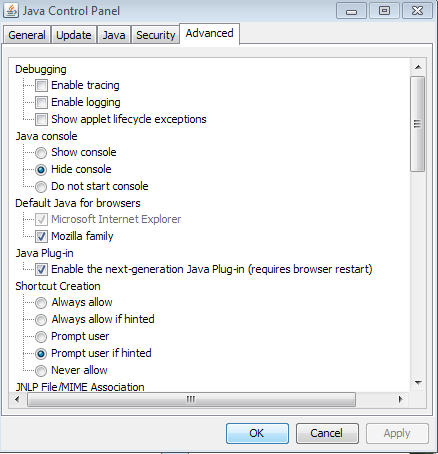
Also in the Java Control Panel / Advanced tab you can specify to run Java with Mozilla family browsers.
Check the screenshot.
Posted : 19/07/2013 7:56 am
Topic starter
I did the check on the java website after having installed the latest version, it was ok
The option for Mozilla is selected by default in the java console so the pb with mozilla is not there..
I asked Daniel Baumann about that, waiting for his answer
I'll keep you posted
Posted : 19/07/2013 7:34 pm

Is it working now?
Posted : 05/08/2013 2:54 pm
Topic starter
yes
Posted : 06/08/2013 1:40 am