


more quick actions
minimize quick actions





Old
7
Posts
4
Users
0
Likes
54
Views

Topic starter
Hello all,
A customer reported a WebVue no longer working since a Java Update.
On his computer, the same problem occurs.
We have deployed all KB articles operations.
I have spent a 2h TeamViewer session and with a simple project, WebVue works fine (PcVue 10.0 Sp1 Update + ie11 or Mozilla + Java Update 67)
We came to the conclusion that could be easily reproduced : on the simple project working properly with WebVue, just add a BACnet configuration, even if no device are on line. After this, WebVue no longer works.
The trigger was only the Java Update. It worked perfectly previously.
A SPR has been declared for version 10
BR Edouard
Posted : 02/09/2014 1:43 pm

Hi Edouard,
I have a customer(last year) who was using PcVue 10.0 SP1 update 16010,Protocol: modbus + BACnet, IE version is lower than 11.0.
The problem for the webvue, is the background color of the drawing object(e.g.: text box) is different from PcVue.
As they updated the java, after we reinstall the java within the DVD, the problem was solved.
We did not have the above issue.
Posted : 02/09/2014 2:31 pm
Topic starter
Hi Shu Quan,
Last year, ie11 did not exist and Java updates were less than 51.
I confirm that last year, WebVue worked fine for the customer with the following project:
- PcVue 10 whatever the version
- BACnet protocol (and modbusIP)
- ie10
- Java version available on the DVD
The problem really came after a recent Java Update > 51
Posted : 02/09/2014 7:33 pm
So it's a java update issue. Thx.
Posted : 03/09/2014 10:42 am
Topic starter
Hello all,
Just to let you know.
After many exchanges Dev / Services / customer.
Armin also participated in this file.
TeamViewer, Skype, mails and so on ...
I still did not have the time to demonstrate the whole thing.
But please be careful when facing a problem with WebVue and BACnet
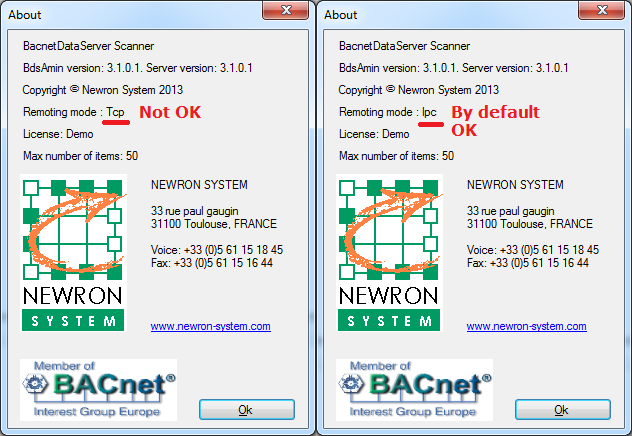
The file concerned is C:ProgramDataBdsServerBDSHiddenSettings.xml
The default value of the key CanUseIPCSetting is true.
For some specific reason, the customer got the value to false and uninstalling completely PcVue + BDSAdmin + reboot was not enough to get the default settings back.
So before the real KB article comes, remind this Forum topic.
BR
Edouard
Posted : 19/11/2014 9:48 pm

Thanks Edouard,
But could you at least describe briefly the symptoms?
Posted : 20/11/2014 8:51 am

The symptoms were as follows:
- WebVue loads correctly
- Login dialog is displayed
- After trying to logon nothing happens
- Trying to access http://[Server]/WebPropertyServer/WebPropertyServer.asmx is successful
- When trying to authenticate over WebServices (for example by using the SVWebPortal demo tool or the WSTValidation.exe) the following exception should occur in the Windows event viewer:
OpenSessionSystem.Web.Services.Protocols.SoapException: System.Web.Services.Protocols.SoapException: Le serveur n'a pas pu traiter la demande. ---> System.Runtime.Remoting.RemotingException: Service demandé introuvable

Server stack trace:
   à System.Runtime.Remoting.Channels.BinaryServerFormatterSink.ProcessMessage(IServerChannelSinkStack sinkStack, IMessage requestMsg, ITransportHeaders requestHeaders, Stream requestStream, IMessage& responseMsg, ITransportHeaders& responseHeaders, Stream& responseStream)

Exception rethrown at [0]:
   à System.Runtime.Remoting.Proxies.RealProxy.HandleReturnMessage(IMessage reqMsg, IMessage retMsg)
   à System.Runtime.Remoting.Proxies.RealProxy.PrivateInvoke(MessageData& msgData, Int32 type)
   à PropertyServer.PropertyServer.Set(String[] oName, Object oValue, PropertyServerOperation propertyServerOperation)
It means that the PropertyServer is blocked by the PcVue connection to the BDS.
Posted : 20/11/2014 6:14 pm