


more quick actions
minimize quick actions






Topic starter
Hello,
So far, there are two customers have the proble that vba program cannot recognize PcVue variables when using []. For example,[Date].
Who has this experience?
BR,
Mark
Posted : 08/04/2015 2:13 pm

I never experienced this issue.
Do you have their projects?
I recommend registering the components...
Posted : 09/04/2015 6:55 am

I experience this situation right now for the first time.
I'm using PcVue 11.1 Update 5 and VBA report me this error if I try to set a variable to 0:
Run-time error '438': Object doesn't support this property or method
When I click debug it put the cursor to this line:
[MACHINESTATUS] = 0
If I put [MACHINESTATUS] in the Watches dialog box it says that it is an object/variable and the value is 1 (which is perfect).
Still in debug mode, if I replace the previous line by this bellow it works:
Variables("MACHINESTATUS").Value = 0
I have the explanation by right clicking on the [MACHINESTATUS] word and select Definition.
In fact MACHINESTATUS is declared in the project as a Withevents variable and there is an associated function MACHINESTATUS_ValueChange.
So in my opinion if we declare a variable in VBA with the same name as a PcVue variable it is no more possible to refer to this variable in VBA using square brakets.
Fortunately there is allways the other technic with Variables collection.
Posted : 09/04/2015 8:23 pm
Topic starter
Hello Ludovic,
Thanks for you sharing.
In my case, we didn't declare a variable in VBA with the same name as a PcVue variable.
Now I found the problem may caused by Reference libriary.
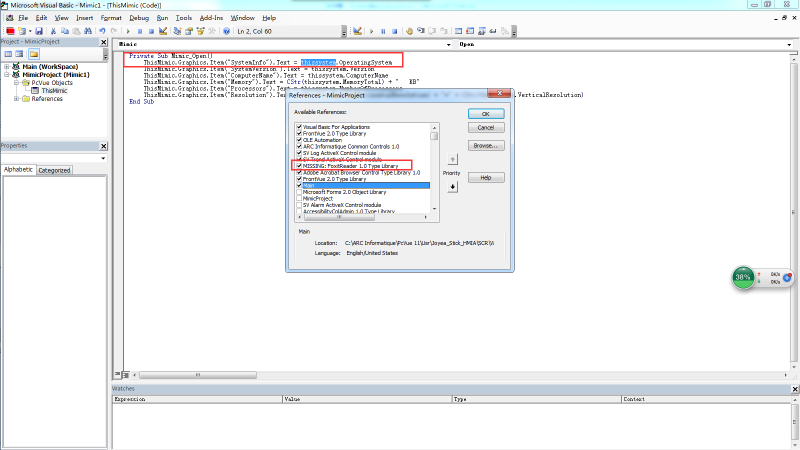
When VBA cannot recognize PcVue variable with square brakets, you can open Tools->Reference dialog, you will find that a few libraries have prefix name ‘MISSING……library’.What you need to do is to un-check this option, then the VBA program should work.
BR,
Mark
Posted : 10/04/2015 8:11 am
Topic starter
Like below picture.
Posted : 10/04/2015 12:04 pm