


more quick actions
minimize quick actions





Scripting
5
Posts
4
Users
0
Likes
34
Views

Topic starter
Accidentially, I discovered an interesting feature in VBA today:
When prefixing the variable name with an additional "@" you may gain access to the previous value of a variable.
For example:
In the following screenshot the variable has been changed from 4 to 5.
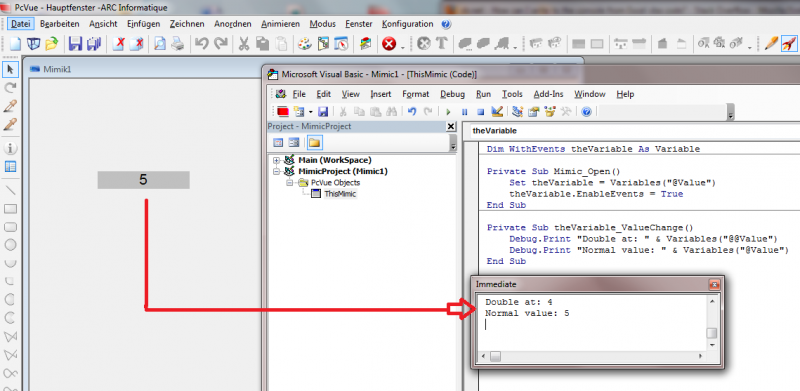
Did you know this? :woohoo:
Posted : 18/06/2013 7:37 pm

Good behaviour. So good KB article to write.
Posted : 18/06/2013 7:41 pm

Wow!
1. Before making a KB I suggest you validate it with Manu Ecochard (in case...)
2. Did you try in Scada Basic?
Posted : 19/06/2013 7:04 am

And there is also:
Variables("VarName").PreviousValue
Variables("VarName").PreviousQuality
Posted : 19/06/2013 12:53 pm
Topic starter
Okay, well, so forget what you have read in this thread.
That behavior is more of a coincidence than intentional. Be careful about this!
Here is Emmanuel's statement regarding my discovery:
Sorry to shatter your dream but this is not a feature... This is a question of variable naming and execution synchronization:
- For the VBA "Variables" collection, the variables "@Value" et "Value" are treated as the same variables but "@@Value" is treated as a different one (see explanation below). So, when you reference "@Value" and "@@Value", the collection creates 2 different subscriptions.
- In your example, you initialize the event mechanism using "@Value" so when the value of "@Value" changes the event is triggered immediately and you can read/display the updated value of "@Value". However, at that precise time, the value of "@@Value" has not been updated yet. The value of "@@Value" will most likely be updated right after the end of the event function.
- If you initialize the event mechanism with "@@Value" you will have the opposite effect of what you have in your example: The value of "@Value" would display the "previous" value.
- You could say that whatever the behavior of the Variables collection it is a good trick to retrieve the previous value a variable and I would answer no it is not because the order in which the variable values are updated is not a sure thing (most of the time it would be in the order the variables are referenced but there is no guaranty)
- Finally as a reminder, if you need the previous value or previous status of a variable, the VBA object "Variable" has properties providing such data ("PreviousValue" and "PreviousStatus" respectively).
Now about the variable naming:
- The variable name processing function in PcVue removes only one "@" character, adds the branches and processes the substitutions to provide what we call a "full name". This is that "full name" that is used to read/write/subscribe a variable.
Posted : 20/06/2013 9:19 pm