


more quick actions
minimize quick actions





Scripting
8
Posts
5
Users
0
Likes
127
Views

Topic starter
Hello experts, I' m finding a solution to display Pie in Mimic for one of our customers. I integrate Webbrowser control into Mimic. The Webbrowser loads local html page which draws Pie by using an open jQuery Lib.I use VBA to call javascript function of html page,and pass parameters(pcvue variables) to javascript to let the Pie displaying dynamically. It can work, but Webbrowser didn't have the animation transition when drawing Pie like IE. The reason is that Webbrowser is based on IE7, so it cannot support this jQuery script. Now I want to let Webbrowser work based on IE10 or IE11. how to do? I also tried to change the registry HKEY_LOCAL_MACHINESOFTWAREMicrosoftInternet ExplorerMAINFeatureControlFEATURE_BROWSER_EMULATION by referring to:"dead link", but it seems not to work. Thanks, BRS, Mark
This topic was modified 2 years ago by LM
Posted : 22/03/2016 2:35 pm
Topic starter
This issue is solved by add an registry: HKEY_LOCAL_MACHINESOFTWAREWow6432NodeMicrosoftInternet ExplorerMAINFeatureControlFEATURE_BROWSER_EMULATION*, the value of '*' is 11001. now my webbrowser is based on IE11. "dead link"
😆 😆 😆
This post was modified 2 years ago by LM
Posted : 22/03/2016 4:02 pm

good news!
Thanks Mark
Posted : 22/03/2016 4:38 pm

Thank you very much Mark for this great trick.
It works on my VM Windows 7 64 bits and Windows 10 and I just want to summarize here how to do.
Goto :
HKEY_LOCAL_MACHINESOFTWAREWow6432NodeMicrosoftInternet ExplorerMAINFeatureControlFEATURE_BROWSER_EMULATION
Then simply add a DWORD 32 bits key named sv32.exe and put a decimal value in it (11001 for example).
Close the registry and restart PcVue, no need to restart Windows.
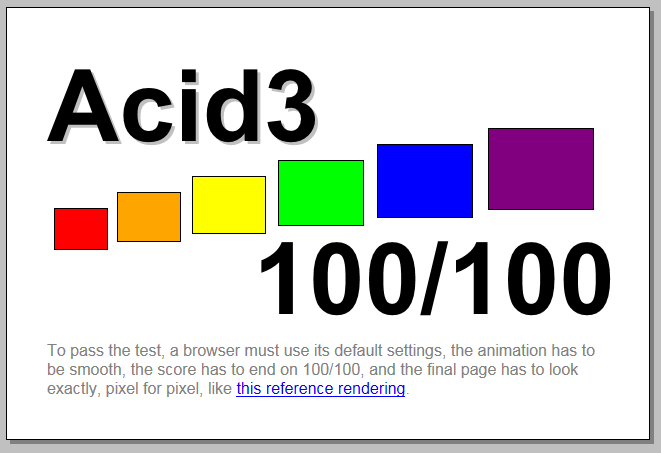
To be sure that it is working you can try to load this web page if you have internet access of course:
- http://www.chisono.it/
To have the version number of the web browser you are using.
Another point that can be interesting to know is that it is possible to configure the ActiveX not to display any error message in runtime. For that open the properties and set property Silent to True:
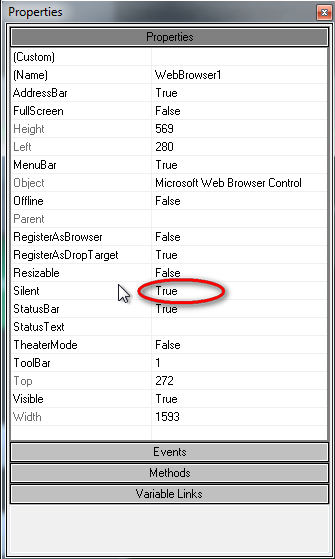
Posted : 29/03/2017 9:00 pm

Thank you Mark !! I have just played with this feature, and I wanted to make a little summary, very simple... 1) ActiveX WebBrowser is natively base on IE7 => it is not possible to correctly display some Website, which are made for another version of IE. 2) It is possible to change the referenced version of IE in the WebBrowser... To do that : a) Go to Windows registry in folder HKEY_LOCAL_MACHINESOFTWAREWOW6432NodeMicrosoftInternet ExplorerMainFeatureControlFEATURE_BROWSER_EMULATION b) Create a key "sv32.exe" (DWORD) c) Assign the value of the key to 11000 for IE11 10000 for IE10 9000 for IE9 3) To know which IE is used by WebBrowser, many websites propose to display version of IE used by the navigator. Test for example this one :
"dead link"
RT
This post was modified 2 years ago by LM
Posted : 30/10/2017 11:58 pm
Topic starter
Hello Raphael,
You said 11000 for IE11,10000 for IE10, 9000 for IE9. It also works? In my test, It was 11001 for IE11, 10001 for IE10 and 9999 for IE9.
Mark.
Posted : 31/10/2017 7:23 am
Hi Mark,
You can use both, in fact... Check the difference between the 2 syntaxes in the Microsoft msdn article: https://msdn.microsoft.com/en-us/library/ee330730(v=vs.85).aspx
As I understand, if you want the default behaviour of IE (ex: IE10), you have to choose the number ending with "0" (ex: 10000). But, in order to choose the good one, the best way is to test 😉
Raphaël
Posted : 31/10/2017 7:37 pm

Hello,
There is some news on this subject:
- There is a new value available for the Feature_Browser_Emulation registry key:
- 11001 (0x2AF9)
Internet Explorer 11. Webpages are displayed in IE11 Standards mode, regardless of the !DOCTYPE directive. - 11000 (0x2AF8)
Internet Explorer 11. Webpages containing standards-based !DOCTYPE directives are displayed in IE11 mode.
- 11001 (0x2AF9)
- Working around the registry key and imposing the rendering engine to use from within HTML code is also possible. The following meta tag does the job:
However, as the HTML code of the WebScheduler is not directly accessible, one would have to wrap the WebSched in a custom web portal (have not tried myself yet...). - An SPR has been created which explains the above subject about allowing the WebSched to impose the good rendering engine. The number is: #65955.
Posted : 22/03/2019 7:59 pm