


more quick actions
minimize quick actions





TouchVue
18
Posts
6
Users
0
Likes
133
Views

Topic starter
Hi
THere's an app TouchVue for Android mobiles
For others (Blackberry,Windows phone,iOS) it's possible to access TouchVue through a webbrowser.
How to do it?
Is a fixed IP address necessary? Do you enter the IP address of your local network and the name of your project?
François
Posted : 17/10/2013 7:47 pm

Hi Francois, Doing it is completely straight-forward. First of all, I think you should test TouchVue locally from the host on which you have installed PcVue and the mobile server. This can be done from any web browser by typing: "http://localhost/SvMobile". Next step would be to test on the internal network by replacing "localhost" with the IP address of the mobile server. A fixed IP address is not necessarily mandatory. Depending on the web server configuration (and the DNS configuration of your network) you could of course use the host name of the server. For internet access it would be typical to configure port forwarding in the firewall. What is different to WebVue for example is that you do not have to specify the project name in the URL. TouchVue automatically connects to the currently active PcVue project. The default name of the web application is "SvMobile" (see URL given above). If desired, the name of the web application could of course be modified on IIS-level (for example: "http://10.0.0.100/TouchVue" or whatever else you would like to call your mobile endpoint). If not used for any other purpose you could also setup your web server to automatically respond with the TouchVue login page for any request to the respective IP address or hostname.
This post was modified 2 years ago 2 times by LM
Posted : 18/10/2013 1:17 am
Topic starter
Thx Armin
I'll try it
Posted : 18/10/2013 10:09 pm
Topic starter
Armin,
Following this topic, I have another very simple questions
I have no android here, so I haven't played with the app yet
One customer needs to demonstrate TouchVue on his Android
Questions :
Where can he find the app?
How will he connect his app to a specific Pcvue server using the app?
thx
Posted : 10/12/2013 4:08 am
Hi Francois, Good question! For that purpose we have a public demo server running in Sèvres. The IP address is: 46.218.141.5. Please open your web browser and go to "http://46.218.141.5/svMobile/download" for downloading the Android app. Then register the server "http://46.218.141.5/svMobile" in the server management view of the app. Username: oncall Password: oncall Alternatively, you may want to try using TouchVue from inside a web browser (without launching the Android app...). In this case just go directly to "http://46.218.141.5/svMobile". Credentials are the same as above, of course. The results of your actions in TouchVue can be validated by connecting to the same application by WebVue in parallel. The WebVue URL is: "http://46.218.141.5/demopcvue/" The demo application that is running on the server is the seminaries demo. But I think it would be better to replace it with the SV_WebDemo. In general, I think it would be good to give the maintainance of this demo portal into your hands in the medium term. 😛 I send you the access credentials by email...
This post was modified 2 years ago 2 times by LM
Posted : 10/12/2013 2:18 pm

You can also get an Android emulator that runs on a PC. I used it to do the screen shots for the help.
Robin
Posted : 10/12/2013 2:33 pm
Topic starter
Thank for your answers
Actually the customer will use its own demo project to demonstrate TouchVue.
I have found the on line help topic about TouchVue, and it looks very well detailed on how to make TouchVue installed and configured (as usual Robin 😉 ) so I forwarded it to the customer.
For the demo it is good, and for your information there's different names and passwords for TouchVue for this demo :
Name/password
ONCALL/ONCALL : TouchVue limited access in French
ONCALL_EN/ONCALL : TouchVue limited access in English
Limited access : browsing level 1 only
MAINT/MAINT : TouchVue full access in French
MAINT/MAINT_EN : TouchVue full access in English
Full access : Level 1 and 2
Basically limited access makes some variables not displayed in TouchVue
I have to document all of this and I will in the future...
François
Posted : 10/12/2013 10:20 pm

@Robin: What Android emulator are you using?
Posted : 19/12/2013 9:09 am
It's supplied with Android SDK (which is open source)
Exact details:
Android SDK Manager
Revision 22.0.1
You can run various emulations mainly according to the screen resolution you want to emulate. It works very well other than being a bit slow on my PC (which is only a mid-range).
I don't know much more about it than that. Cesar is yer man. He has been playing with Android as part of a "personal project" he is/has been working on.
Robin
Posted : 19/12/2013 2:29 pm

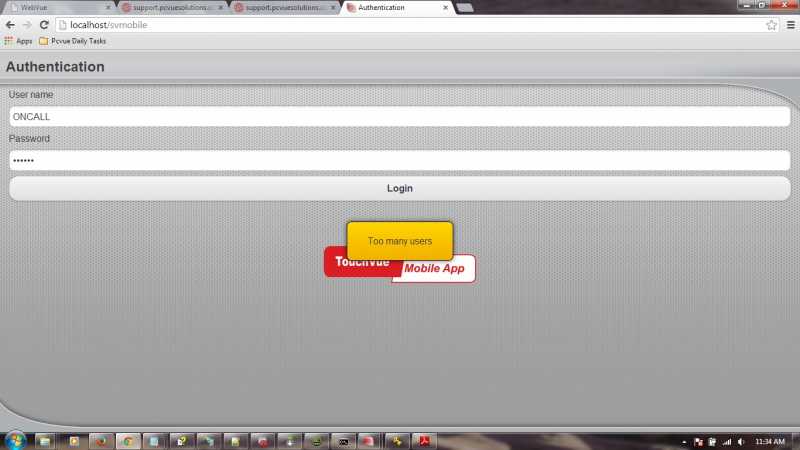
Hi guys, I'm trying to access the WebVue project using Touchvue apps (web app & android emulator) on my local pc. I can login to the WebVue project using "http://localhost/webdemo_en" (u:user_webvue,p:web) & (u:ONCALL,p:ONCALL) but cannot access when using Touchvue app both on my local pc's browser and emulator, "http://localhost/svmobile". The login prompt throws "Too many users" error? Is there any setting that I must do before I can access the project using touchvue? Thanks -irwan-
This post was modified 2 years ago by LM
Posted : 05/03/2014 9:35 am
Hi,
Did you use the demo mode?
As my experience, with demo mode we could only use one webvue/touchvue(via URL) user. So you can try to close webvue and then try.
But with demo mode, I succeeded to logon two touchvue users at the same time: one user for APP, the other for URL.
Posted : 05/03/2014 10:05 am
Hi,
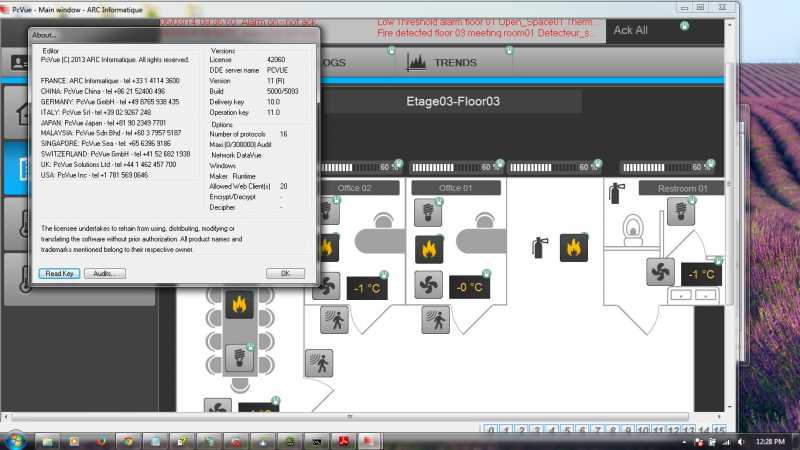
It's not running in demo mode. But to be safe, I closed every browsers and emulator and reopen on one browser only. Thanks.
Posted : 05/03/2014 10:34 am
As I know in demo mode, if i logon more than 1 user, then it says "Too many users...". In fact, it's demo mode does not allow more users. I dont know whether your dongle has the TouchVue option, and how many.
Maybe you can try without the dongle and use demo mode. I used the DemoPcVue, and it works with demo mode as i said in my above post.
Posted : 05/03/2014 10:57 am
Hi,
You're right. I removed the dongle and it is working now. TQ for your time.
-irwan-
Posted : 05/03/2014 11:10 am
Topic starter
BTW, is there a way to run TouchVue on APPLE devices (other than using Safari of course)?
Is there an android app emulator for applE?
Posted : 14/03/2014 8:24 pm
- 1
- 2