


more quick actions
minimize quick actions





Archive Data mgt
30
Posts
4
Users
0
Likes
147
Views

@Shu Quan
Let's wait the result of the system variables tracking and you will see after.
Latest info.: As the project is running on the site, so the engineer can only modify it in the weekend night. PcVue had lost data for each last Saturday and Sunday.
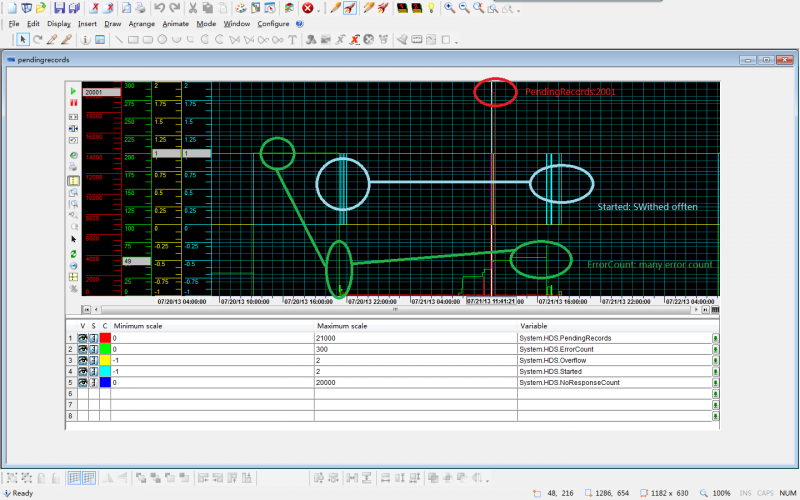
For last Saturday(7.20), he could not modify the project as Nico K suggested, so the issue was reproduced easily.But we dont see the pendingrecords has exceeded to 20000.
2013/07/20,13:48:32.093,PYAPPSLAVE,Administrator,HDS,E,0,0,OPCCallback::OnDataChange __ HDS can't treat all the events. Try to reduce the number of information recorded by your application.
2013/07/20,13:48:33.077,PYAPPSLAVE,Administrator,HDS,E,0,0,OPCCallback::OnDataChange __ HDS is no more saturated.
2013/07/20,13:48:33.093,PYAPPSLAVE,Administrator,HDS,E,0,0,OPCCallback::OnDataChange __ HDS can't treat all the events. Try to reduce the number of information recorded by your application.
2013/07/20,13:48:34.062,PYAPPSLAVE,Administrator,HDS,E,0,0,OPCCallback::OnDataChange __ HDS is no more saturated.
2013/07/20,13:48:34.077,PYAPPSLAVE,Administrator,HDS,E,0,0,OPCCallback::OnDataChange __ HDS can't treat all the events. Try to reduce the number of information recorded by your application.
2013/07/20,13:48:35.046,PYAPPSLAVE,Administrator,HDS,E,0,0,OPCCallback::OnDataChange __ HDS is no more saturated.
2013/07/20,13:48:35.062,PYAPPSLAVE,Administrator,HDS,E,0,0,OPCCallback::OnDataChange __ HDS can't treat all the events. Try to reduce the number of information recorded by your application.
2013/07/20,13:48:36.030,PYAPPSLAVE,Administrator,HDS,E,0,0,OPCCallback::OnDataChange __ HDS is no more saturated.
2013/07/20,13:48:36.046,PYAPPSLAVE,Administrator,HDS,E,0,0,OPCCallback::OnDataChange __ HDS can't treat all the events. Try to reduce the number of information recorded by your application.
2013/07/20,13:48:37.015,PYAPPSLAVE,Administrator,HDS,E,0,0,OPCCallback::OnDataChange __ HDS is no more saturated.
2013/07/20,13:48:37.030,PYAPPSLAVE,Administrator,HDS,E,0,0,OPCCallback::OnDataChange __ HDS can't treat all the events. Try to reduce the number of information recorded by your application.
2013/07/20,13:48:38.108,PYAPPSLAVE,Administrator,HDS,E,0,0,OPCCallback::OnDataChange __ HDS is no more saturated.
2013/07/20,13:48:38.124,PYAPPSLAVE,Administrator,HDS,E,0,0,OPCCallback::OnDataChange __ HDS can't treat all the events. Try to reduce the number of information recorded by your application.
2013/07/20,13:59:03.077,PYAPPSLAVE,Administrator,HDS,E,0,0,OPCCallback::OnDataChange __ HDS is no more saturated.
For last Sunday, he added the server-list to the database and removed un-used extended attributes from trend tables, and then PcVue lost data again.
2013/07/21,11:40:43.045,PYAPPSLAVE,Administrator,HDS,E,0,0,OPCCallback::OnDataChange __ HDS is no more saturated.
2013/07/21,11:40:43.061,PYAPPSLAVE,Administrator,HDS,E,0,0,OPCCallback::OnDataChange __ HDS can't treat all the events. Try to reduce the number of information recorded by your application.
2013/07/21,11:40:44.029,PYAPPSLAVE,Administrator,HDS,E,0,0,OPCCallback::OnDataChange __ HDS is no more saturated.
2013/07/21,11:40:44.045,PYAPPSLAVE,Administrator,HDS,E,0,0,OPCCallback::OnDataChange __ HDS can't treat all the events. Try to reduce the number of information recorded by your application.
2013/07/21,11:40:45.014,PYAPPSLAVE,Administrator,HDS,E,0,0,OPCCallback::OnDataChange __ HDS is no more saturated.
2013/07/21,11:40:45.029,PYAPPSLAVE,Administrator,HDS,E,0,0,OPCCallback::OnDataChange __ HDS can't treat all the events. Try to reduce the number of information recorded by your application.
2013/07/21,11:40:46.107,PYAPPSLAVE,Administrator,HDS,E,0,0,OPCCallback::OnDataChange __ HDS is no more saturated.
2013/07/21,11:40:46.123,PYAPPSLAVE,Administrator,HDS,E,0,0,OPCCallback::OnDataChange __ HDS can't treat all the events. Try to reduce the number of information recorded by your application.
2013/07/21,11:40:47.092,PYAPPSLAVE,Administrator,HDS,E,0,0,OPCCallback::OnDataChange __ HDS is no more saturated.
2013/07/21,11:40:47.107,PYAPPSLAVE,Administrator,HDS,E,0,0,OPCCallback::OnDataChange __ HDS can't treat all the events. Try to reduce the number of information recorded by your application.
2013/07/21,11:53:09.092,PYAPPSLAVE,Administrator,HDS,E,0,0,OPCCallback::OnDataChange __ HDS is no more saturated.
As the engineer needed to go back to their office today, so he modified the DefaultMaxBufferedEvents from 20000 to 50000. We'll see the result later, maybe as Florent said, we can only delay the issue.:(
Posted : 22/07/2013 6:43 am
The customer called me that after he modified the default value from 20000 to 50000, and yesterday afternoon(14:00 around Beijing time), PcVue met this issue again.:(
Posted : 23/07/2013 6:11 am

Hello Shu Quan,
The ErrorCount is not abnormal has there are some primary key violation in the logs. This value is resetted only at PcVue startup.
About the PendingRecords, what I see is that it increases up to over 20000 in a few seconds. For me it means that there is a treatment which push into the HDS a lot of records. Do they only use the svmgrTrendPeriod dll ? Maybe there is more details in pcvue logs when it begins to increase.
With a zoom around this pic, we will see exactly what happened and when, if it takes several minutes to reach the limit or or juste 2 or 3 seconds...
About de Started variable, the best is to look at the hds and pcvue logs when they occurs. You probably will find further details.
Finally, with the limit at 50.000 do the curves have the same appearance ? If yes, it means that the treatment push more than 50.000 records ! We really hav to know is running at this time.
Maybe you can attache the traceX file from PcVue of the corresponding period of your screenshot.
Posted : 23/07/2013 11:51 am
Thanks Florent!
I did not add another screenshot here. It took 10 minutes to increase up to 20000, and then overflow last 10 minutes. See bellow:
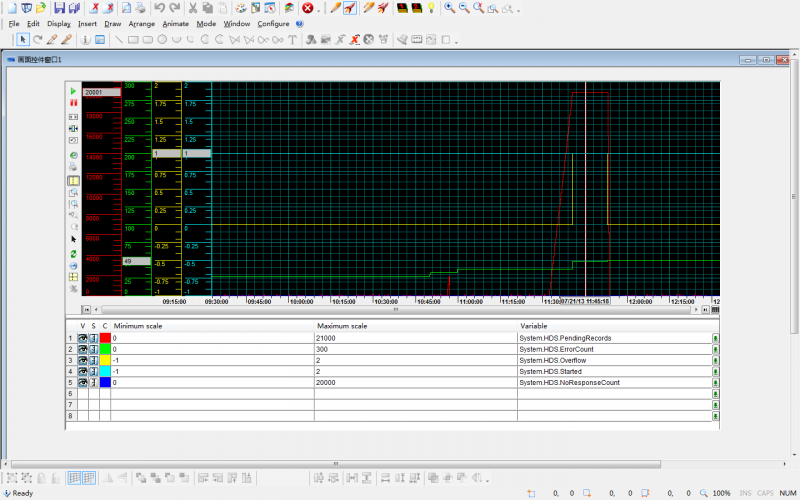
One correction: the SQL is installed on the Windows Server 2003 R2, 32 bits(PcVue Server) also with 4GB RAM. And in normal time, the SQL uses more than 1GB RAM. This is not good, and may cause the problem.
Today, I reproduced the issue with my computer: windows 7, 64 bits, 4GB RAM. With 160 registers recorded with 1s update rate and without deadband, and another 30 registers stored by the dll for each second. Normally, the pendingrecords will be less than 300. If I opened the DR, Outlook, VM and even Kaspersky to scan virus, then the pending records increased sharply(In the below screenshot, I modified the default maximum to 100000, with virtual memory to 6022MB. ).
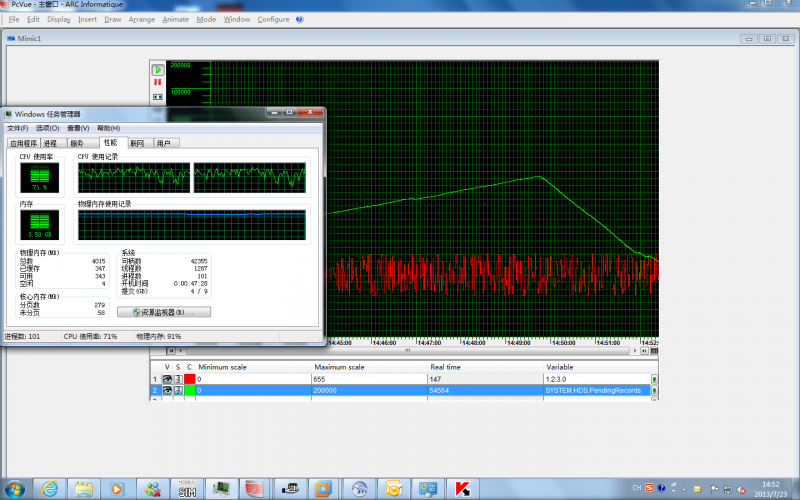
Logs from the customer.
Posted : 23/07/2013 1:12 pm
I dont know whether I can attached a file with more than 10MB...It's a video i made with default value 20000.
Posted : 23/07/2013 1:20 pm
Well...
I've got the answer about the start/stop of the hds. It's because they've started/stopped PcVue several times (at least 10 times between 16:51 and 18:18) There is no more logs over the interesting period.
Posted : 23/07/2013 1:38 pm
About the estimation of a correct value of the "DefaultMaxBufferedEvents" parameter.
You need two things:
- the average number of events per second. Call it E
- the maximum time your database could be unavailable (in seconds). Call it S
Then the DefaultMaxBufferedEvents should be at least at the value E*S
For example, if you want to support a 1hour shutdown of the database with 100records/s, you'll need to set the parameter to 3600*100 = 360.000 at least (and you add a 10% margin...)
In your case you've reached the limit after only 10minutes. Then your E = 20000/(10*60) = 33.33 evt/s, which is quite low regarding the amount of trends you have.
If you've got a treatment which lock the database or slower, it must not run more than 10mn. With a limit of 50000 it's 25mn.
Check with your customer what are the other process that are running on the computer and which one can interfer with the database and its performances.
Posted : 23/07/2013 1:59 pm
Hello Florent,
Your calculation/fomula is impressive. 33.33 evt/s is normal, because there are 24 windspeed registers, for others register(rain, snow...) in normal case, they don't change often.
Yes, now we are waiting the info. on RAM usagewhen PcVue have this issue and the 3rd party applications installed on the OS . But the engineers are not on the site as they have to go to another site. Only their colleague(does't know PcVue) from another department can help to check. And the guy does not have time to watch the task manager all the day.:(
So we planned to modify it to 100000 or bigger to delay the issue as possible as we can.
Posted : 23/07/2013 2:29 pm
Just to update the info.: after the modification(set 100000 to "DefaultMaxBufferedEvents"), this issue has not happen again. We'll see what will happen in coming weeks to make sure that the issue will not happen.
Posted : 29/07/2013 10:56 am

Ciao Shu Quan, Hello everybody,
same identical problem with an Italian customer.
1 Windows Server 2008 R2 (Very powerful PC 12 Cores, 16 GB Ram etc.) BUT... SQL Server Express...
Same story of Receiving point with same datetime on trend
I have suggested to this customer to increase the value of DefaultMaxBufferedEvents parameter, but I'm interested to know if you have some feedback from your customer.
Is the problem disappeared after this modification?
Thankyou! :cheer: :cheer:
Posted : 18/10/2013 3:52 am
Ciao Filippo,
In my case, the issue happened with the SvMgrRefreshData.dll. After removed this dll and we did not have this " Receiving point with same datetime on trend" any more.But the data over flow still exists.
Did your customer use this dll also? Maybe in the SQL log, you can check which Variable has this issue, and then check its behavior and configuration.
Posted : 18/10/2013 6:41 am
Thank you Shu Quan for your fast reply! :cheer:
No, my Customer didn't use the SvMgrRefreshData.dll but he have the same errors that you have encountered & well described.
Unfortunately these errors happens randomly both for Trend and Log entries in the DB so apparently it's not related to a group/kind of variable.
I'm start to think about some OPC failure: since this Customer use Kepware as OPC data source for his project (OMRON PLCs), maybe Kepware send the same event to PcVue twice with the same date-time... I need to investigate more or at least check if the option for using the source-timestamp on OPC is disabled... :blink:
Since there're for sure some problem also with the Kepware part (No response from the server) is this scenario possible?
- Kepware send a notification to PcVue
- PcVue manage this notification & write the entry on the DB
- PcVue send back the ACK to Kepware
- The ACK is lost (for instance because the OPC Server it's busy)
- Kepware send again the same event to PcVue
- PcVue manage this event again but the entry on the DB still exist... --> ERRORS on HDS
I'm wrong or this situation can be real?
Thank you for your help! 🙂
Posted : 18/10/2013 4:25 pm
That maybe the problem. Good luck, Filippo! B)
Posted : 21/10/2013 6:52 am
Hello Filippo,
There are several possible reasons for this messages:
- device timestamping: if you stop/restart your server, you can have this message, or with somme communication problems with the server.
- replications between databases
- in cas of server redundancy, if you restart one of your server, it will get the VTQ from the first server and try to re-archive some points
In the case you describe, you can't have the hds error. Why ?
Because PcVue add a records in the db only if there is a change in the VTQ of your variable. If Kepware send the same event, it will have no effect because, on PcVue side, there will be no VTQ modification. But if between the 2 messages, there is a communication loss, with the variable becoming NS, then, PcVue will try to record the second event.
Posted : 21/10/2013 11:38 am
Thank you Florent for your very useful reply.
I can "discard" your points 2 and 3 (replication and redundancy) because this project is based with only 1 server and 6 terminal clients.
So the interesting remaining point is for sure the #1, you have given me an interesting information about the writing behaviour: the OPC problems that this customer have, can for sure trigger some PcVue/OPC timeouts and put some tags in NS-COM.
I take the opportunity of this thread to ask what can are the possibile workarounds OPC Client-side (of course the best is to try to optimize the communication in the OPC-Server side):
- Disable the "Use time provided by the server" option? Can be avoid a double entry with the same VTQ?
- Increase OPC timeouts? (General option of OPC Server / Check server status period and-or Frozen Context Detection ? Can these settings prevent (or at least delay) the NS-COM status?
Thank you very much
Posted : 21/10/2013 3:09 pm
- 1
- 2