


more quick actions
minimize quick actions






Topic starter
Hello.
I have a recurrent request from customers which is being able to enumerate all the variables that are referenced by the animations in a mimic.
As far as I know there is no standard way to achieve this. I have tried to go through the list of graphic items in a mimic in VBA and evaluate their animations but unfortunately the Animation object always seems to be empty (am I missing a cast?):
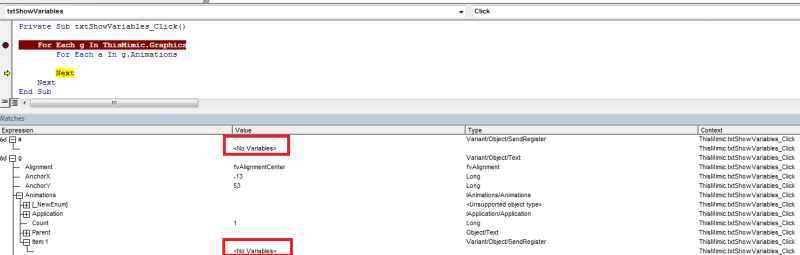
Besides that I have two questions:
- Has anyone of you ever written some piece of code (VBA, SCB, svmgr...) which fulfils this requirement?
- If not available in such a simple way, do you agree with me that it would be very helpful to expose an interface with the list of variables in a mimic to one of the scripting languages and/or svmgr? I mean internally the list must be there already in UI in order for UI to make the variable subscriptions to VAR.
Posted : 09/07/2013 12:51 pm

Hi Armin,
Indeed the Animation object has not been exposed to VBA with intention.
But, here is the trick, it has been exposed on Enable!
So, activate Enable, adapt your code and run it B)
Don't forget to deactivate Enable after usage...
Posted : 09/07/2013 2:51 pm
Topic starter
Thanks, Nico. Can you tell what was the intention behind?
Meanwhile, I tried to make it work with Enable but due to the absence of auto-completion and documentation of the Animation object it is almost impossible to get something working.
Posted : 09/07/2013 4:17 pm
me.Graphics("Shape1").Animations("Anim1").Var
will give you the variable name of the first animation on the Shape1 graphical object 😉
Posted : 09/07/2013 4:31 pm

Seems to be more complicated than what it looks !
Did you think about interlock condition, and animations with several variables (group bit, XY positionning, ...)
I have no solution to suggest...
Posted : 09/07/2013 4:51 pm
Hey, I never said it's easy. And, actually yes, it's not! There are several specific cases.
But if you run this code in VBA (no need Enable here) it should work.
Sub GetVarInAnimations()
Dim g As Graphic
Dim a As Object 'Represents an animation
On Error Resume Next
For Each g In Me.Graphics
For Each a In g.Animations
Debug.Print "Animation Name: " & a.Name
Debug.Print "Variable Name: " & a.var
Debug.Print "Variable Name: " & a.var1
Debug.Print "Variable Name: " & a.var2
Debug.Print "Variable Name: " & a.var3
Debug.Print "Variable Name: " & a.var4
Debug.Print "Variable Name: " & a.var5
Debug.Print "Variable Name: " & a.var6
Debug.Print "Variable Name: " & a.var7
Debug.Print "Variable Name: " & a.var8
Next
Next
End Sub
Not so clean but....
Note I didnt try with a trendviewer...
Posted : 10/07/2013 8:34 am
Topic starter
Great, it works. Thanks Nico!
About the specific cases that I need to cover I think it is mainly evaluating the full variable name of animations in a symbol.
No need to support macro-animations or the more complicated animations for the moment.
I will let you know if one of my customers has additional requirements or inputs.
Posted : 10/07/2013 1:04 pm

It will be great to make a KB article on this. It can be usefull for others, I think.
Posted : 11/07/2013 6:18 pm
Hmmm I don't really agree.
I think if we judge that it's a need then we must request from development to expose the Animation object correctly.
The VBA code I gave is not clean and was just to unblock Armin. I am not sure we must publish it publicly!
Posted : 12/07/2013 7:14 am

Niko, it is possible to create a private article.
Note "PRIVATE" in the summary and the moderator will insert it to the private section (just for ARC people)
Posted : 12/07/2013 12:08 pm
Ok, but before, somebody has to test it.
What happens for Variables used in Trendviewer, listbox, combobox,...?
What happens for Variables used as interlock?
What happens for Variables used as thresholds in a bargraph?
and so on...
I have no idea.
If somebody has the time to do it...no problem 😉
Maybe Armin will encounter some issue and will let us know.
Posted : 12/07/2013 1:25 pm