


more quick actions
minimize quick actions






Topic starter
Ciao all! 🙂
During the development of my project using IEC61850 I defined 200 IEC61850 devices under the same network, but only 1 is reachable (the one I have on my desk for testing).
As a consequence, the IEC61850 communication is very slow and sometimes tags goes on NS-COM also on the available device: if I stop absent devices leaving active only the available one, the speed improves and NS-COM disappears.
Is it normal? It happened also to someone else?
It can become a problem on real site?
Someone have a feedback about that?
Thanks a lot!
Posted : 31/03/2017 4:13 pm

Hi Filippo,
Of course that's not normal. You must check what happen using wireshark and also 61850 traces.
By the way, the communication must not be slow as well...Are you using Dataset or Reports?
Nico
Posted : 03/04/2017 8:03 am

I agree with Nico,
As a general rule, device on a network should not interfere with each other (unless the devices are using a serial line).
So you need to investiage an keep the technical referent aware of that (I think it is Brice 😉 )
Posted : 03/04/2017 6:34 pm

hello,
when a device is disconnected, PcVue still try to be connected and sends, at least, watchdog messages.
I think it increases communication traffic and PcVue work.
It is not the case when you disable the communication at device level.
Wireshark traces could help to understand exactly what happens.
thanks
Posted : 07/04/2017 4:34 pm
Topic starter
Hello!
Thank to everybody for your answers.
I probably found the solution... 🙂
There's a very important setting at network level:
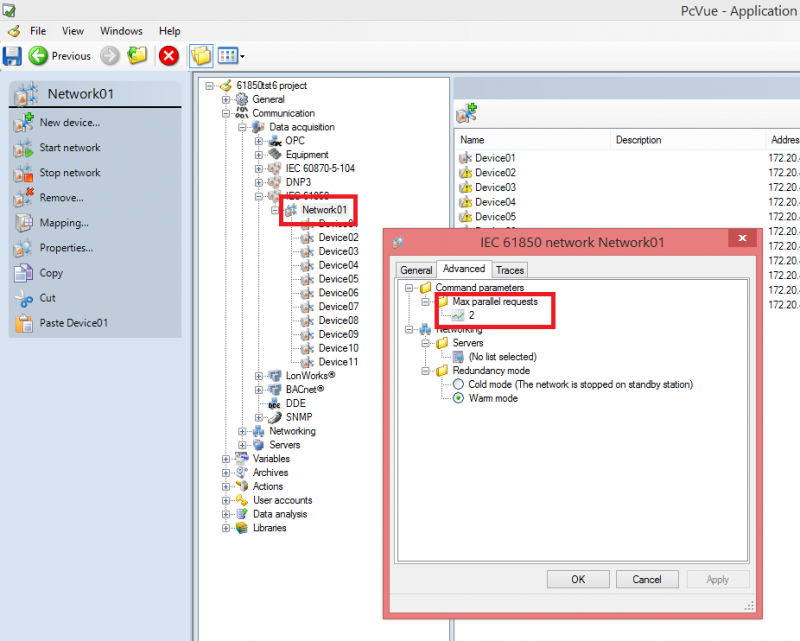
I don't know backgrounds, but increasing this settings (max allowed is 255) it increase the communication speed also reducing recovery time after faults. I will try to set this value equal to the amount of devices inside the network and I let you know.
Posted : 19/04/2017 12:14 am
Ho yes, correct, I totally forgot this parameter.
Increasing the value can speed-up the communication indeed.
Nico
Posted : 19/04/2017 7:05 am