


more quick actions
minimize quick actions






Hello all,
I try to establish a DDE conversation with Excel without success. I used PcVue 10 SP1 (I also try with PcVue 10 release) and Excel 2007.
In PcVue I configure the DDE connexion like the attached file.
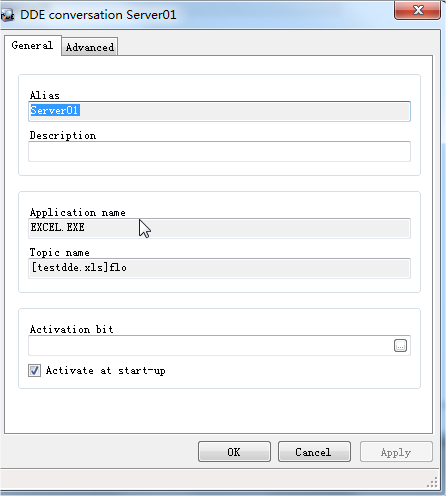
I open the excel file testdde.xls and in the sheet flo i put this syntax on a cell: =SV|DB!register01
Register01 is a PcVue variable link to DDE.
In PcVue Register01 is NSCOM and in Excel I get the value 0 in My cell. And if I write =SV|DB!toto I got an error see picture below:
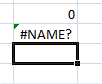
Looks there is a connexion between PcVue and Excel but it doesn't work.
Thank you for your help.
Posted : 16/01/2013 2:21 pm

What operating system are you using? As I remember there are some changes in DDE in Windows 7 associated with security issues.
Cheers, Robin
Posted : 16/01/2013 2:38 pm

Thanks Robin.
I used Windows 7 but I also tried on WIndows XP and I have the same behaviour.
Posted : 16/01/2013 3:22 pm

Florent, you made a mistake.
The Register01 variable must not be configured as DDE! Doing this you said: This data is coming from a DDE Server but in your Excel cell you want to get this data from PcVue!
So, what do you want to do actually?
1. Display in Excel a PcVue variable value.
In this case PcVue is the DDE server:
- No need to configure a DDE conversation in PcVue.
- Configure your variable as internal and set the value
- Configure the Excel sheet as you did
2. Display in PcVue a value coming from an Excel cell
In this case PcVue is the DDE client:
- Configure a DDE conversation as you did.
- Set in Excel a value in your cell (i.e. cell R1C1)
- Configure the register01 with the Excel cell coordinates (item=R1C1)
Posted : 17/01/2013 10:35 am
Thank you it Works!
😆
Posted : 17/01/2013 2:18 pm