


more quick actions
minimize quick actions






Hello,
I have some question about Logviewer on PcVue 10 Sp1:
1) A customer wants to print a multi-selection of line of the logviewer. I tried in our office by using the Scada basic verb LOGDISPLAY("printselected","log", "*", "Log1");
The print function works but I can print only one line, despite the fact I selected 3 or 4 lines. Do you experienced same kind of problems?
2) The same customer wants to sort the logviewer from the lastest event to the new one. I also try the scadabasic function in order to sort the logviewer. But without success. I think it's impossible, could you confirm it?
Thank you
Posted : 19/04/2013 11:36 am

Hello,
1) A customer wants to print a multi-selection of line of the logviewer. I tried in our office by using the Scada basic verb LOGDISPLAY("printselected","log", "*", "Log1");The print function works but I can print only one line, despite the fact I selected 3 or 4 lines. Do you experienced same kind of problems?
You must configure the printer to work in multiline. There is probably a KB article describing that.
Hello,
2) The same customer wants to sort the logviewer from the lastest event to the new one. I also try the scadabasic function in order to sort the logviewer. But without success. I think it's impossible, could you confirm it?
Sorting by timestamp in Logviewer will be available in V11
Posted : 19/04/2013 11:42 am

Thank you Nicolas,
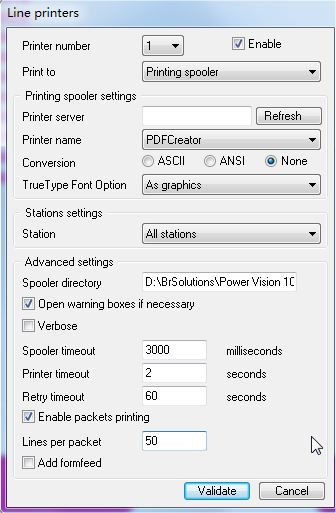
I didn't find any KB articles, but the option in order to send packets to the printer as picture.
I set 50 lines in a packet. But PcVue will send 6 lines maximums. For example if I send 10 lines, PcVue will send 2 lines then 6 lines then 4 lines.
I try with two different printers and with PDF creator and I have the same result.
Do you have solution?
Posted : 19/04/2013 2:27 pm
Hello,
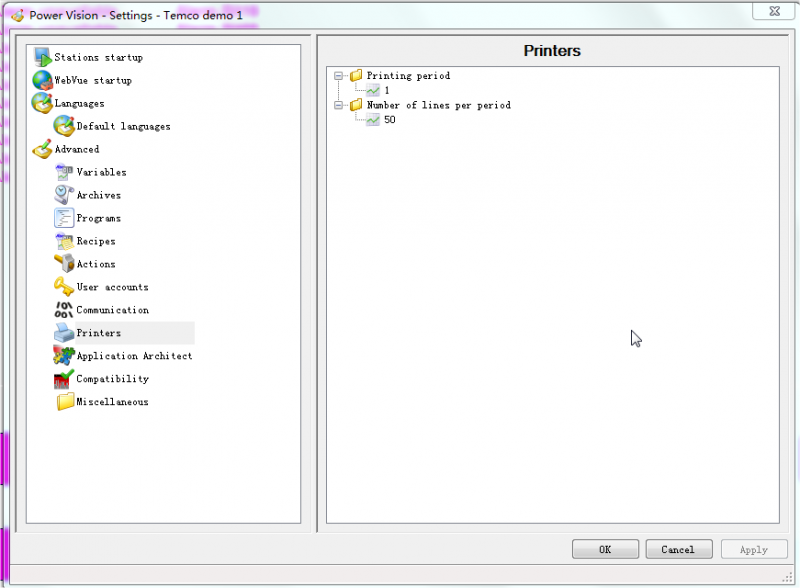
We had Jin Chun and he tell us an option on PcVue project setting.
If we increase the number of lines on this option, then it works well. See picture attached.
Best regards.
Posted : 19/04/2013 2:56 pm
Indeed, that's what I would like to reply.
I am surprised there is no KB article on this issue as it's a periodic request from our customers.
Florent, I suggest you add it 😉
Posted : 19/04/2013 3:29 pm
Ok I will add it.
:cheer:
Posted : 25/04/2013 8:21 am
I made the article : KB649 for this function
Posted : 19/06/2013 6:57 am