


more quick actions
minimize quick actions






Topic starter
Hello!
I discovered after 4 hours and 2 cup of coffee that from Windows Server 2016 this useful Microsoft feature seems to don't work anymore:
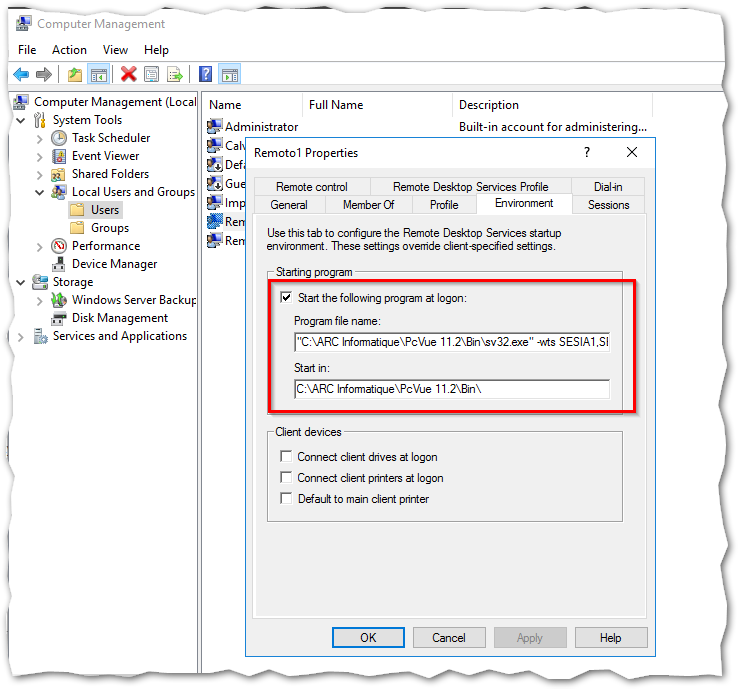
I've always used it because it allows you to start a Remote Desktop session with PcVue only by natively blocking access to desktop and start menu.
Apparently in Windows Server 2016 this setting is ignored and we must activate it manually by doing a registry modification.
Do you have any feedback?
My friend Anthony, :whistle: :whistle: Did you meet this issue?
Thank you!
Posted : 17/05/2018 4:17 pm

Hello Filippo
I don't test this feature with Windows Server 2016.
Have you try with "Start in" field empty?
If it is true, the microsoft KB article is very important.
Posted : 17/05/2018 5:02 pm
Topic starter
Ciao Anthony,
apparently also leaving the "Start in" field empty, nothing change.
Additionaly, I realized that apparently is not anymore mandatory to be under domain or be domain controller to activate the Remote Desktop Session Host role, which is good for us in case of small projects. This was mandatory in Windows Server 2012.
I think it's a good idea to validate these two points and in case to create a KB article for future references... 🙂 🙂
Posted : 17/05/2018 5:44 pm

Ciao Filippo,
I am not a RDS expert but I think it is really recommended that RDS running under a domain environment. I know it is not mandatory yet but...
nico
Posted : 18/05/2018 6:51 am
Topic starter
Ciao Nico!!
I'm happy of this because some italian customers have seen the obligation of a domain under RDS environment (started with WS2012) like a pain :woohoo:
When I read "Raccomended" in manufacturer's documents I wonder if there's a strong technical reason behind or just only a way to sell more products playing upon people's fear. B) 👿
In small environment sometimes can be better to have no domain than a misconfigured environment:. Less roles means less security risks, less updates to install etc.
Of course a domain add some possibilities (main one with PcVue is no need of SCADA-BASIC scripts to broadcast USER.DAT), including administrative policy, audit control etc.
Do you have different experiences?
Ciao!
Posted : 18/05/2018 11:56 am
Hmm I would say having a domain is more safe in term of cyber security. No more...
The best would be to have the opinion of our IT team Alec/Loick.
In case, I attached here a document that Alec did few years ago on how to implement RDS on 2012 R2. And it is well specified that a domain is mandatory. RDS without domain is possible but it is more a trick to keep the compatibility with older Servers like 2012.
Nico
Posted : 18/05/2018 2:41 pm