


more quick actions
minimize quick actions






Topic starter
Estimados Colegas,
As you know, for temporary license, we store the “date of last use” in the dongle to prevent someone to use a dongle that expired just by setting the computer back in the past (before expiration date).
But sometime the user plays with the computer clock and set the date in the future, so we encode this date in the dongle and when user set the clock back to present we consider that the new date is not valid (because prior to the last date recorded in the dongle).
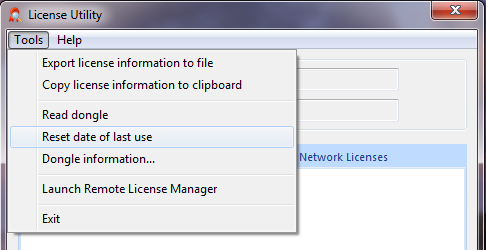
To unlock the user you have to launch the License Utility with a –clock command line argument, that will make a hidden menu item appear ‘Reset date of last use”.
This will unlock the user by resetting the date of last use, but it can be done only once on a given dongle.
From Niko Demirdjian
Posted : 06/10/2016 9:22 am