


more quick actions
minimize quick actions






Topic starter
Hi Team,
I have a client who is asking how to hide all option for right click button. Their reasoning are as below :
Hiding the arrow is not for aesthetic reason only. In the current project, there's a requirement using right click mouse to send the control to the equipment. By having the arrow on right click mouse, it's not acceptable by our customer.
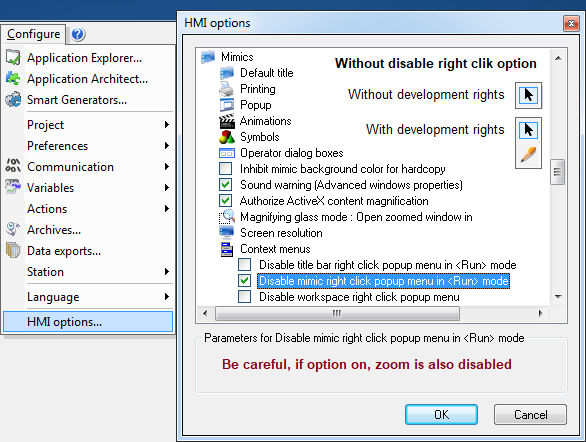
The right click option still available as of now are as in below image. For the pencil, it can easily be hidden by using runtime license dongle.
Is there any option or configuration file that can be modified to disable the arrow option? The right click option shall be hidden for all user profile including developer.
Client is on PcVue 11.2, build 6070. Station is Windows 10.
I appreciate in advance all help to be rendered. Thanks.
Thanks,
Kantha


Posted : 14/01/2019 11:56 am
Topic starter
Hi, are other people able to view my post? It appear to me with error message "Rendering Error in layout Message/Item: Property "inline" is not defined. Please enable debug mode for more information."
Edit : I am able to see the reply properly but not my orignal post. So I copy the text of original post here :
Hi Team,
I have a client who is asking how to hide all option for right click button. Their reasoning are as below :
Hiding the arrow is not for aesthetic reason only. In the current project, there's a requirement using right click mouse to send the control to the equipment. By having the arrow on right click mouse, it's not acceptable by our customer.
The right click option still available as of now are as in below image. For the pencil, it can easily be hidden by using runtime license dongle.
Is there any option or configuration file that can be modified to disable the arrow option? The right click option shall be hidden for all user profile including developer.
Client is on PcVue 11.2, build 6070. Station is Windows 10.
I appreciate in advance all help to be rendered. Thanks.
Thanks,
Kantha
Posted : 14/01/2019 12:02 pm

Hi Kantha,
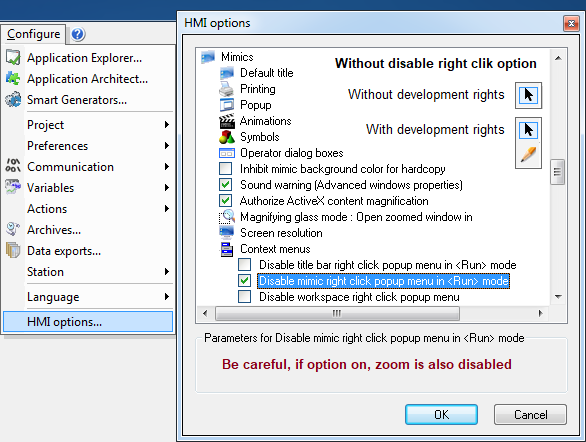
Here is the answer:
BR
Edouard
Posted : 14/01/2019 4:01 pm
Hello,
Test test test
Posted : 14/01/2019 4:48 pm
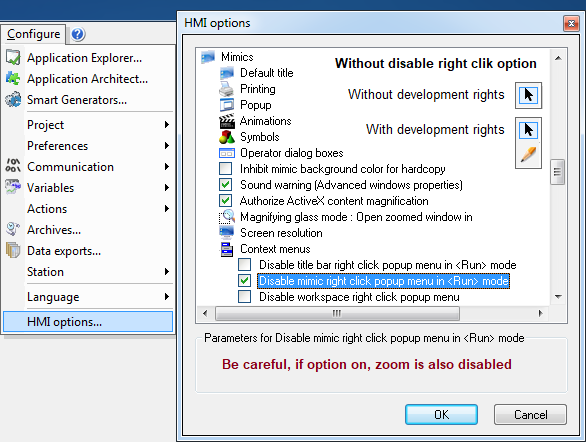
Hi,
Posted : 14/01/2019 4:49 pm
Posted : 30/01/2019 4:20 pm
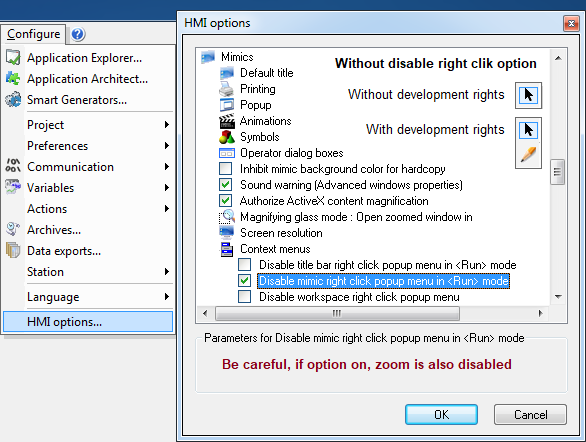
This is a test.
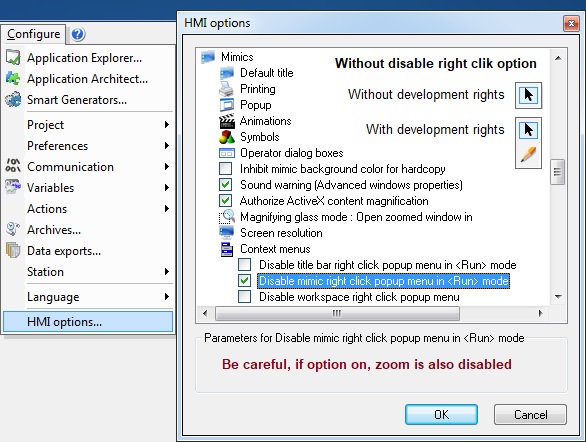
FYI, Rendering issues are still on the Forum
Posted : 30/01/2019 4:43 pm
Topic starter
This is irrelevant to this topic, but seems like the images are still not visible. But I have 1 trick for viewing the images in urgent case, user can click on "Quote button", and the images will be visible now 🙂 Hope this helps others who came here looking for answer.
Posted : 30/01/2019 5:36 pm
Rendering issue are still present in Forum.
You are right Kantha, Clicking on button "Quote" displays Posts properly.
It is the same when you click on button "Reply" and finally "cancel" (just to see the images)
Posted : 30/01/2019 6:07 pm