


more quick actions
minimize quick actions






Topic starter
Hello everyone
Have you already used the virtual keyboard launched from PcVue?
I tried to deactivate the UAC,
I tried using osk.exe from C:WindowsSystem32 or C:WindowsSysWOW64
I tried to copy/paste the osk.exe in another path with everyone rights...
I tried from animation and SCADA program
but it doesn't work
Posted : 30/09/2016 7:11 pm

Hello,
It's been a long time I have faced this issue, since W7 in fact (maybe SP1?).
Even when using old version of PcVue (9.0 for example). It works fine with XP but not "new" OS
I remember configuring osk.exe at Windows startup and tell the costomer not to close it.
I'm gonna have a look at a better workaround and come back ...
Edouard
Posted : 03/10/2016 7:05 pm
Thanks to Internet and many tests, ...
http://www.vbforums.com/showthread.php?776981-RESOLVED-Onscreen-Keyboard-No-Workie
http://www.vbaexpress.com/forum/archive//t-34397.html
... here is a solution in VBA:
- new mimic
- one shape (Shape1)
- copy/paste the following code
Private Declare Function ShellExecute Lib "shell32.dll" Alias "ShellExecuteA" (ByVal hwnd As Long, ByVal lpszOp As String, ByVal lpszFile As String, ByVal lpszParams As String, ByVal LpszDir As String, ByVal FsShowCmd As Long) As Long
Private Declare Function Wow64EnableWow64FsRedirection Lib "kernel32.dll" (ByVal Enable As Boolean) As Boolean
Private Sub Shape1_Click()
On Error Resume Next
Wow64EnableWow64FsRedirection False
'DOES NOT WORK: ShellExecute 0, "open", "C:WindowsSysWOW64osk.exe", "", "C:WindowsSysWOW64", vbNormalFocus
'DOES NOT WORK: ShellExecute 0, "open", "C:WindowsSysWOW64osk.exe", "", "", vbNormalFocus
ShellExecute 0, "open", "osk.exe", "", "", vbNormalFocus
Wow64EnableWow64FsRedirection True
End Sub
No need to set Windows UAC to low. The default is fine.
The main reason why it does not work in PcVue, is because Osk.exe is 64bits, not PcVue.
It is quite weird because when a folder is set for the .exe file or in the path, it does not work and we get "Could not start On-Screen Keyboard" error! (Tested under W7)
VBA specialists can feel free to give any advice
Posted : 03/10/2016 8:49 pm

Hmmm, sorry maybe I misunderstood but what Virtual Keyboard are you talking about? And what PcVue/OS version?
I just created 1 project with V11.2 on W10, make a standard Send / Register animation requesting Keypad and then it worked first shot!
Nico
Posted : 04/10/2016 8:58 am
Topic starter
We spoke about Windows keyboard.
My customer found that PcVue keyboard is too small on 12 inches display.
My mimic with the button to start the keyboard (PcVue 11.2) :
Posted : 04/10/2016 12:41 pm
OK got it.
Well done Edouard!
Nico
Posted : 04/10/2016 1:20 pm
Here is an update about this subject.
There is a strange behavior depending on the OS.
When using W7, whatever the profile, it works fine.
But with WS2012R2, it does not work if the profile has not Preferences right
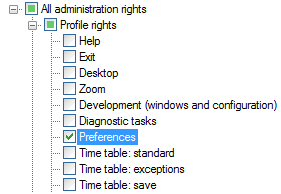
Any idea of the issue?
Posted : 19/05/2017 12:59 pm

Hello,
Regarding this topic, I was reading about the function Wow64EnableWow64FsRedirection, and found that this function has been replaced by 2 new functions Wow64DisableWow64FsRedirection and Wow64RevertWow64FsRedirection, reference here: https://docs.microsoft.com/en-us/windows/win32/api/wow64apiset/nf-wow64apiset-wow64disablewow64fsredirection
So the updated code will be like this :
Private Declare Function ShellExecute Lib "shell32.dll" Alias "ShellExecuteA" (ByVal hwnd As Long, ByVal lpszOp As String, ByVal lpszFile As String, ByVal lpszParams As String, ByVal LpszDir As String, ByVal FsShowCmd As Long) As Long
Private Declare Function Wow64DisableWow64FsRedirection Lib "kernel32" (ByRef oldvalue As Long) As Boolean
Private Declare Function Wow64RevertWow64FsRedirection Lib "kernel32" (ByVal oldvalue As Long) As Boolean
Private Sub Shape2_Click()
On Error Resume Next
Dim lWow64RedirectReturn As Long
lWow64RedirectReturn = 0
Wow64DisableWow64FsRedirection lWow64RedirectReturn
ShellExecute 0, "open", "osk.exe", "", "", vbNormalFocus
Wow64RevertWow64FsRedirection lWow64RedirectReturn
End Sub
Just for the record, the original code that was shared by Edouard still works, but I think it is for the purpose of backward compatibility.
Posted : 03/01/2022 3:16 pm