


more quick actions
minimize quick actions





Old
14
Posts
4
Users
0
Likes
344
Views

Topic starter
There is a problem in WebVue with detecting the availability of the JRE in Internet Explorer 11.
The issue has been fixed on 17/03/2014 for versions 11.0 Update 09, 11.1 and later.
However, if you encounter the problem you can apply the following workaround:
- Just copy the two files in the attachment to the WEB folder of the PcVue project.
- index.html needs to be overwritten. Please check if it has been modified by the end customer before overwriting.
This fix should work in PcVue 9.0, PcVue 10.0 and PcVue 11.0.
EDIT, 17/04/2014: The original fix was not working in PcVue 10.0 and earlier versions. I have added a second archive for download which is specific to PcVue versions 10.0 and below (DeployJava - Legacy.zip).
This fix should work in PcVue 9.0, PcVue 10.0 and older.
Posted : 04/04/2014 12:29 pm

Armin,
OK, I understood that if we use the couple PcVue 11 (= 06009.
What will happen if the client has IE9 or 10? still working?
Posted : 17/04/2014 3:20 pm
Topic starter
Armin,
OK, I understood that if we use the couple PcVue 11 (= 06009.
What will happen if the client has IE9 or 10? still working?
Hi Nico.
It is not only about PcVue 11. IE 11 will not be detected correctly in all PcVue versions prior to 11.0.06009.
As you said the fix is integrated in 11.0.06009 and later.
IE9 and IE10 are still no problem. In fact, what we did, was to integrate the offical Java Runtime detection that is offered by Oracle (Java Deployment Toolkit) and replaced our own detection mechanism with it.
Posted : 17/04/2014 3:44 pm

Hello Armin,
Just to be sure, if I use PcVue 8.10, Can I use your fix ?
Thanks
Posted : 04/06/2014 3:37 pm
Topic starter
Hi Brice,
Yes, should be working just fine. I have not explicitly tested on PcVue 8.10, but the index.html generated by PcVue 8.10 is the same as for PcVue 9.x and 10.x.
Just remember to use the "DeployJava-Legacy.zip" package download.
Posted : 04/06/2014 4:22 pm
Topic starter
Hi Nono,
Sorry, documentation about that is not updated yet. But you can do it in exactly the same manner as before. You just need to add the sessionid parameter to the applet's loading attributes:
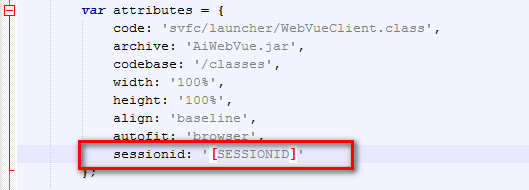
After that it depends on the portal that your customer is designing how to set this value. It can be either by passing a URI-argument or by filling a hidden field or else...
Posted : 07/07/2014 12:34 pm
Topic starter
Hi Nono,
Please find attached a sample application which replicates the behavior of the obsolete SV_WSDemo portal example: it passes the id of a web services session which is created by the OpenCustomSession operation into an internal frame where an instance of WebVue is launched. This is achieved by delegating the session id as a URI argument into the IFrame.
In the IFrame the JavaScript part of the index.html file is modified so that it adds the session id to the attributes object which is passed into the applet.
Posted : 08/07/2014 1:39 pm
Topic starter
Do we have the wrong method to invoke the screen?
I do not think you are using the wrong method. OpenCustomSession is just right for that. Could you please create an SPR for this problem? It sounds really strange to me. I think it is best to let Daniel and Bruno investigate the issue.
Posted : 16/07/2014 6:57 pm
Topic starter
One small addendum to this topic...
When you require full-screen mode in Internet Explorer you may experience a vertical scrollbar and a small border at the bottom of the screen, even if you may have dimensioned the applet in the good way (height: 100%).
The reason behind is that the default values for borders around applets in Internet Explorer don't seem to be 0px.
I suggest setting all values for the positioning of the applet explicitly in the index.html file:
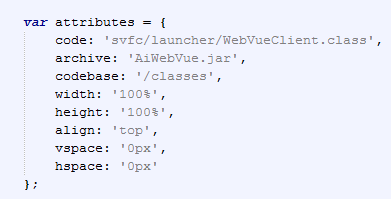
Please note: This fix will be introduced with PcVue 11.1. It is not included in the DeployJava patch files!
Posted : 19/08/2014 4:59 pm

Hi everyone,
In this post I will explain how to set up Automatic Login in PcVue 10.0 SP2.
Firstly you have to go Configure -> Project -> Users Accounts -> Profiles and you set up your profile.
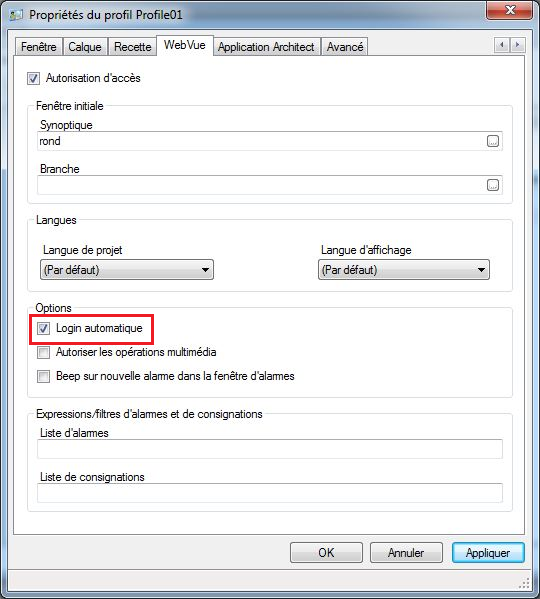
You check the Automatic Login option.
Then you close PcVue.
To continue with the set up, you have to go to your WEB folder of your project.
Firstly you have to replace the index.html file in the WEB folder of your project, with the index.html file of a PcVue 11.1 Version.
In the WEB folder of your project, you will add the deployJava.js file that you can find in the WEB folder of PcVue 11.1 Version too.
Then you have to edit the index.html file, and replace the indicated fields in red, with you user and your password:
var attributes = {
code: 'svfc/launcher/WebVueClient.class',
archive: 'AiWebVue.jar,AiTools.jar,AiTrend.jar,AiAlarmList.jar,AiLogList.jar',
codebase: '/classes',
width: '100%',
height: '100%',
align: 'top',
vspace: '0px',
hspace: '0px',
username: 'w',
password: 'w'
};
NOTE: You need to replace the "archive" field with this syntax: AiWebVue.jar,AiTools.jar,AiTrend.jar,AiAlarmList.jar,AiLogList.jar
When you are finished editing the file, you save it and you close it.
You open PcVue again and you run your web browser to access WebVue.
You should now access WebVue with an Automatic Login.
I hope this could help you.
If you have any questions, feel free to ask me. 🙂
Posted : 02/11/2015 3:18 pm
Hello Enzo,
First of all, thanks for this job.
If you want to go deeper in the Support team process, maybe you could write a KB article 😉 .
See you.
PS: be careful, Nico will warn you that your post is not written in the right subject.
Posted : 02/11/2015 3:32 pm
Topic starter
[...] maybe you could write a KB article 😉 [...]
Please no KB-article on this topic!
Note that usage of automatic login is no longer recommended due to CyberSecurity considerations. It is absolutely not a good idea to have the username and password included in plain-text in the index.html file!
Please also refer to the online help of PcVue 11.1:
Due to modern security guidelines we no longer recommend the use of this property. However it has been kept for backwards compatibility. For further information contact your support authority.
Posted : 02/11/2015 4:12 pm
@Armin: OK I agree that we dont recommend doing it but the problem is that's required quite often. So let's imagine the customer reads the help and saw: "For further information contact your support authority."
We are the support therefore we need providing an official and unique answer.
Yes, writing the password in html file is not a good idea but what is the secured alternative we propose?
In my point of view the good one would be having a option "Remember password" in the login dialog and the login/password is stored in the Java cache or in the Navigator passwords manager...
So, finally, what official answer should we give?
Nico
Posted : 03/11/2015 8:26 am
Topic starter
That is a good question, Nico.
In fact, we do not have an acceptable solution today. For me it is like autologin just does not exist. The only reason why we did not completely remove this option for PcVue 11.1 is backward compatibility.
If a customer wants to use this feature anyway, he must understand that he does it completely on his own risk and that the username/password combination used for the WebVue access will potentially be disclosed to all the client computers that have logical network access to the WebVue server. Furthermore, it also can be sniffed from the physical network when not using SSL/TLS-encryption.
Under absolutely no circumstances I would like to be responsible for leakage of the password as a services engineer. My advice is: Convince the customer to abstain from autologin.
I know that this is not a satisfying answer to your question, but unfortunately there is no better answer today.
P.S: Of course, we will have the "Remember me" function for the new WebVue.
Posted : 03/11/2015 4:33 pm