


more quick actions
minimize quick actions






Topic starter
Hello!
I need to guide our Brasilian friends for the installation and configuration of PcVue in Remote Desktop Services under Windows Server 2012 R2.
Any of you have any document (even in draft or not finished/complete) that explain how to install and configure from scratch a Windows Server 2012 R2 machine for PcVue + Remote Desktop Services?
Doesn't care if not complete, I can use it as a base - finalize it and then share it.
Anthony? :whistle: :whistle:
Thankyou!!
Posted : 01/06/2016 7:02 pm

Maybe you can use Extra Training Module 32 😉
Posted : 01/06/2016 7:05 pm
Topic starter
Wow!
Thank you Romain! It's exactly what I need! 🙂 B)
(And thanks to the author of this good document!)
Posted : 01/06/2016 7:29 pm

Could you send me it please ?
Posted : 08/06/2016 7:32 pm
Is there someone to send me it ?
please
Posted : 16/06/2016 2:21 pm

1, 2, 3 4 5 6 beers.....see you at the next ITM
Posted : 17/06/2016 2:56 pm
Easy at ITM, beer are free 😉
see you
Posted : 17/06/2016 4:28 pm
Whenever you want guys. Ask Brice I often pay him beer when we work together !
Posted : 17/06/2016 4:49 pm
I know that, I remember when I came in your office.
You don't need a specific training on something ?I remember that your office is nice in june/july 😉
Posted : 17/06/2016 5:03 pm

Hi,
Filiopo, which PcVue version do you use? The Module 32 works for PcVue version before PcVue 11.2.
Since PcVue 11.2, keep the same process but you needn't to install svTS service (Chapter 5.3 of Basic) , because PcVue 11.2 installs automatically the service named Sv Core Session Host, you just need to change in Automatic start.
We need to update the 32 module
Posted : 24/06/2016 11:06 pm
Topic starter
Thankyou Fabien!!
In my case it was 11.1 but good to know: I was aware of some modifications but, after your explanation, it's seems easier in 11.2 than in 11.1 :cheer:
In the meantime, waiting for the update of the module 32, anyone knows a fast way to check the version of the training package downloadable from the Intra? I used to download it from the intra and keep it locally in my PC but I don't know how to see from there if the Intra's version is newer than mine, link name is only "ENU - For Trainee - Complete Extra modules package"...? 🙂
Thankyou!!
Posted : 27/06/2016 7:33 pm

Hi,
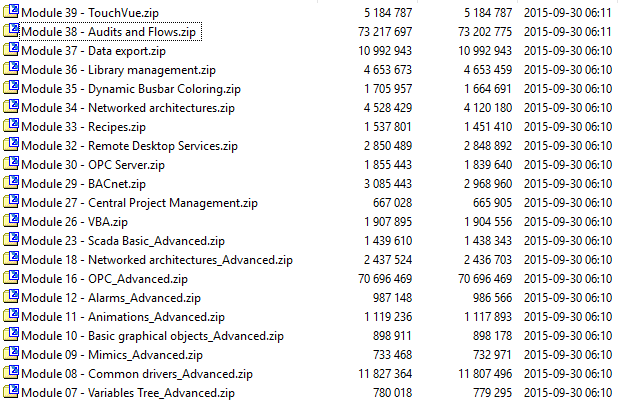
Filippo, to answer your question, there is no way to check the exact version of the package except having a look at .zip file timestamp.
The current "ENU - For Trainee - Complete Extra modules package" from intra have files zipped the 30th of September, 2015.
Posted : 27/06/2016 9:02 pm

Good point!
I will add a versioning management for the future 11.2 modules.
Nico
Posted : 29/06/2016 1:13 pm