


more quick actions
minimize quick actions






Topic starter
Hello,
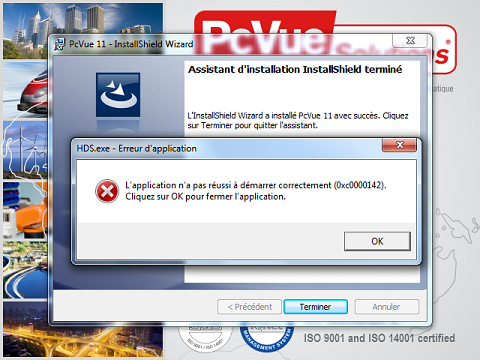
Have you ever met this issue with HDS.exe error.
PcVue can be launched (no way for SQL archiving) but if trying to register components, a similar error is displayed.
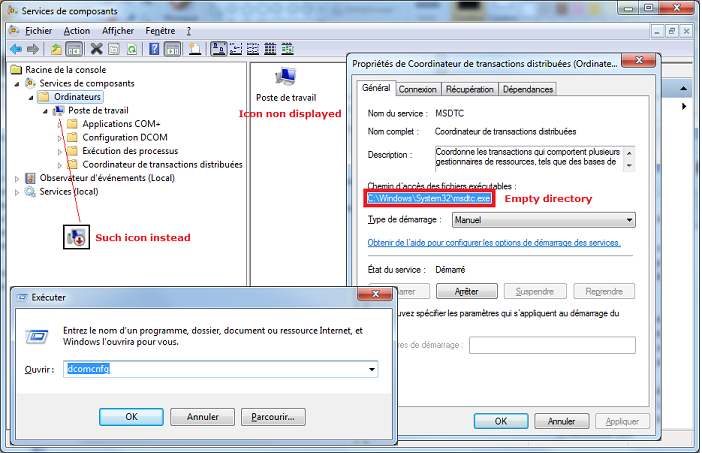
In my opinion, the answer is in the fact MSDTC is corrupted.
Attached screenshots in French
Regards
Edouard
Posted : 04/04/2014 7:15 pm

Hello,
A customer of mine has the exact same HDS installation issue. However, in his case the MSDTC configuration looks good.
Best Regards,
Emmanuel.
Posted : 06/05/2014 9:47 pm

Last week we didn't suceed to instal PcVue on a customer laptop during a training.
Same issue during install.
I didn't looked at the MSDTC configuration.
The customer had many different software installed and he said that he will ask to his IT to try to fix it.
Posted : 07/05/2014 12:04 pm

Hello,
I met the same problem with a customer.
Did you check the manufacturer of the computer (HP, DELL,...) ?
Thanks
Posted : 19/05/2014 8:54 pm
Hello,
I don't think it's link to MSDTC because in my case there is no problem with it.
But same case with HDS error and the same error code (0xc0000142).
PC is a HP PRO BOOK.
Posted : 20/05/2014 1:32 pm
Hello,
I just got a call from another customer who encounters a similar issue on a laptop HP PRO BOOK 6560b with Windows 7 SP1 32bits:
- He didn't have any issue during installation
- But every time he start PcVue he is asked to register the components because the HDS is not registered.
The other one of my customers who has the issue at installation time was on a Laptop Toshiba Tecra i7.
Posted : 20/05/2014 6:54 pm
Well I think I found the trouble !!!!
Thanks to Jacqueline and a powerful tool !!!! She provides me a software named "Process Monitor" which allows you to see every transaction/access made during the execution of a process.
Thanks to this, I saw that a spyware was launched due to a edition of the windows registry.
The SpyWare is Optimizer Pro.

So I asked the customer to delete it and test PcVue again.
Wait and see.
Posted : 20/05/2014 8:46 pm
For your information, the customer confirms the diagnostic.
I think for the others cases it is the same problem.
To go deeply, the registry LoadAppInit_Dll is launched when a process is executed. It is used to launch an antivirus which analyses the process.
In the case of my customer, it was not an antivirus but a spyware.
Now it works fine.
I think Edouard, you can close the subject.
Posted : 21/05/2014 12:40 pm