


more quick actions
minimize quick actions






Topic starter
One customer had this issue on Windows 2016 with PcVue 11.2 Update 6.

General error
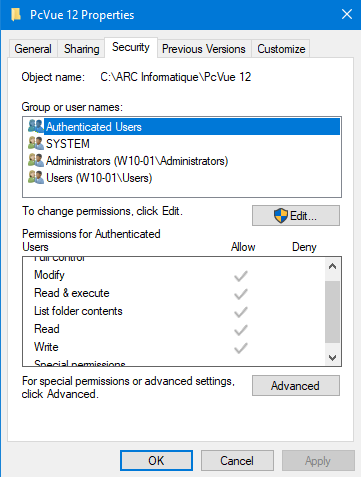
By simply adding the group "Authenticated users" with write right to the PcVue folder we fixed the issue.
By default this group is added and configured properly when we install PcVue on Windows 10 for example, but not on Windows 2016.
Posted : 17/05/2018 7:38 pm

Hi Ludo,
This is more general than Web Scheduler.
On 2016 when you setup PcVue and start directly PcVue you should have an error message saying you don't have the sufficient rights.
Indeed the current user doesn't have the rights on the PcVue bin folder and you MUST apply the 'Modify' rights to all users that are supposed to run PcVue.
About the Web Scheduler the user is inherited from IIS therefore it is the group IIS_IUSRS that should have automatically the rights to the bin folder.
But, strangely, I have a site right now that having a similar issue. WS can't connect saying it doesn't have the sufficient rights to open the WS config file. It's not exactly the same issue but looks quite similar.
I will update this post to say how we fixed this issue (if we do!)
Nico
Posted : 18/05/2018 6:58 am